This article covers:
- Installing the hypervisor packages
- Checking the uCPE Interface Creation and Mapping
- versa-virtmgr Sevice Fails to Start
- Alarm Description for uCPE
Installing the Hypervisor Packages
Follow these steps to install the hypervisor packages:
- Run the request system hypervisor enable no-confirm CLI command to install the hypervisor packages. It will create the OVS-bridges and interfaces from vni-0/300 to vni-0/307.
request system hypervisor enable no-confirm
NOTE: Install the hypervisor packages before pushing the uCPE-service chain template. If these packages are not installed before the template push, then the starting of guest-vnf will not go through and the task will fail. - Run the udo virsh version shell command to check the installed version.
sudo virsh version
Compiled against library: libvirt 4.0.0
Using library: libvirt 4.0.0
Using API: QEMU 4.0.0
Running hypervisor: QEMU 2.0.0
- Run the show interfaces brief CLI command to check the interfaces.
Checking the uCPE Interface Creation and Mapping
Follow these steps to check the uCPE interface creation and mapping:
- Run the show interfaces brief CLI command to see the newly created interfaces from vni-0/300 to vni-0/307
- Run the show interfaces statistics | grep UCPE CLI command to see the interface mapping of the uCPE interfaces to the OVS-switch.
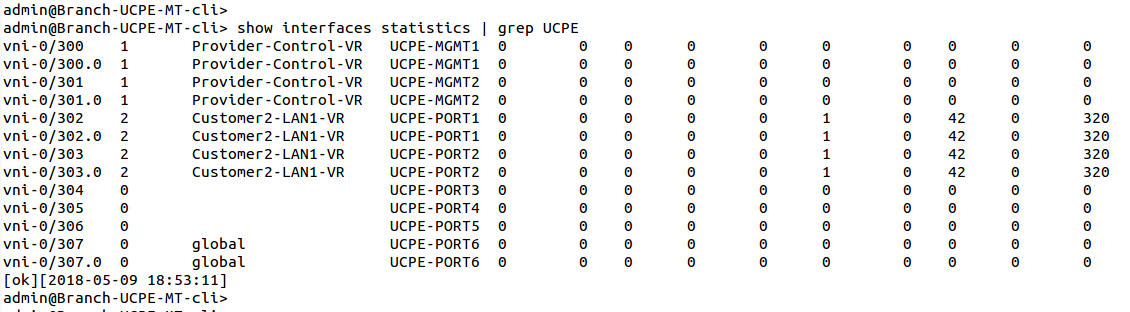
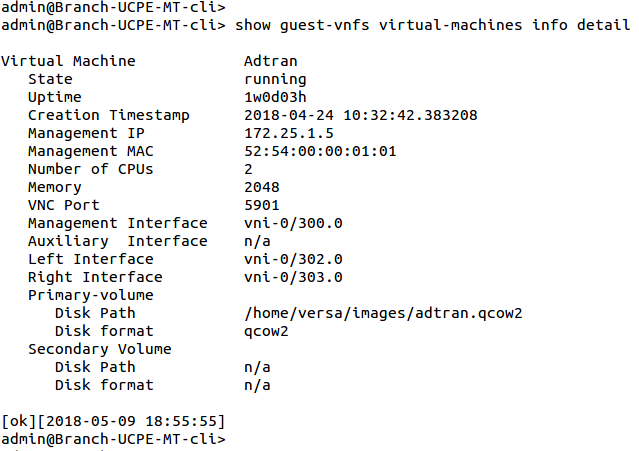
- Run the show guest-vnfs virtual-machines info detail CLI command provides you the status of the VNFs running in the device.
versa-virtmgr Sevice Fails to Start
Follow these steps when the versa-virtmgr sevice fails to start.
- Run the sudo initctl start versa-virtmgr shell command to start the service individually.
- Versa-virtmgr service depends on the versa-virtlogd and versa-virtlockd services. Please check the status of these services in the vsh status output. Start this manually when this service fails to come up.
sudo service virtlogd start
sudo service virtlockd start
- Run the sudo initctl start versa-virtmgr shell command to start the service.
Alarm Description for uCPE
Follow these steps to obtain the notification alarm for uCPE:
- Run the show alarms last-n 205 | grep virtmgr CLI command to view the alarms generated for the management reachability of the running VNFs, provided that health-monitor is enabled in the virtual machine's configuration. These alarms are generated when the management interface is not reachable.
cli> show alarms last-n 205 | grep virtmgr
virtmgr    guestVnfDown            2018-05-02T15:45:42-0 Provider: Guest VNF Adtran is down. Management interace probe failure
virtmgr    guestVnfUp              2018-05-02T15:47:12-0 Provider: Guest VNF Adtran is up. Management interface probe success
- Run the show alarms last-n 200 | grep sfc CLI command to view the alarms generated for the data-path reachability between Versa-VNF and the third-party VNF. This monitoring is triggered when the bypass-on-fail is generated under the org-level service-chain-instance.
cli> show alarms last-n 200 | grep sfc
sfc     sngDown       2018-04-23T17:25:58-0 Customer2: Service Node Group Fortios-FromLAN-SNG is down. Health monitor failure
sfc      sngUp         2018-04-20T15:34:31-0 Customer2: Service Node Group Fortios-FromLAN-SNG is up. Health monitor success