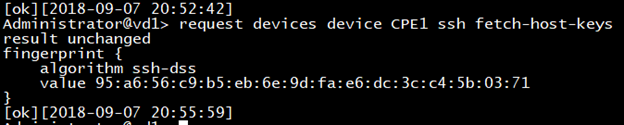
This article explains troubleshooting steps for branch reachability :
1. Ping branch management IP from director and vice-versa. If ping is successful, then move to step 7.
Branch management IP can found under appliance tab in VD GUI

2. Check the route for 10.0.0.0/12 subnet or branch subnet.
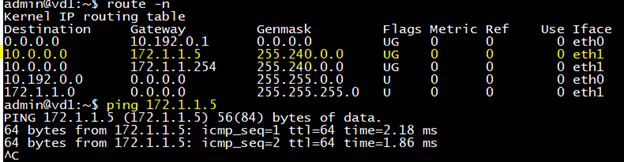
3. Additionally, we can enable tcpdump on eth1 matching branch IP to check if ICMP packets are being sent/received.

4. On controller, Director southbound interface subnet is imported in control-vr using instance-import policy. Check if this route is getting advertised to branch vi BGP or not.



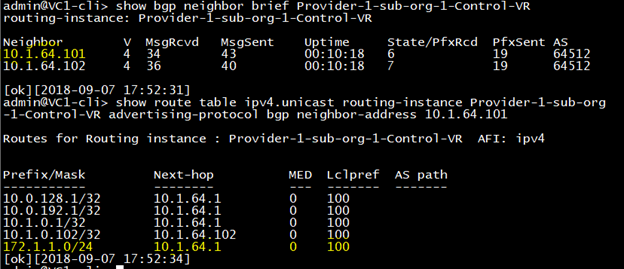
5. On controller, check if reverse route is being leaked into Provider-VR.

6. On Branch, check if VD subnet is being received or not.

7. If Director to Branch reachability is fine but branch device is refusing ssh connection from VD.
For example below:

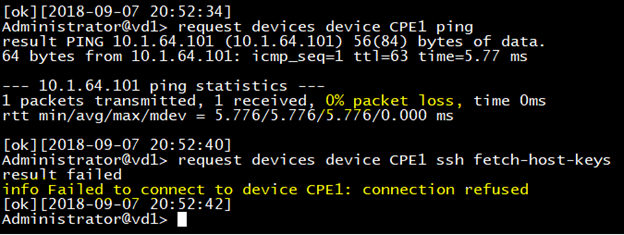
8. Check if port 2022 open in branch device or not.

9. Check VD southbound IP is mentioned in vnf-mananger. (if director are in HA then mentioned both director’s southbound IP)


10. After configuring above, execute below command to fetch ssh keys which confirms ssh connectivity is fine.