Table of Contents
Case1: Check IP Reachability
Case2: Check Netconf/SSH
Case3: Contact Support
Purpose
The purpose of this document is to provide users tools and steps to narrow down and mitigate reachability issue between Director and Appliance (branch). Director communicates with appliance using netconf protocol over SSH on TCP port 2022. It is importance to understands that VD communicates with Appliances only via controller.
Case1: Verify IP Reachability between versa Director and Branch
1.1 Ping Branch Management IP from director shell.
- Ping mgmt address of the branch with unique packet size.

1.2 Check IP Reachability between director to controller.
- Ping northbound IP address of controller – the ip address of controller that connects to director.

- Take the session extensive output on controller to make sure controller is forwarding the packets towards Branch.
- If session is not created on controller, it’s likely that ping packet (icmp) is not even reaching controller. Please ensure IP connectivity between controller and Director before proceeding further.
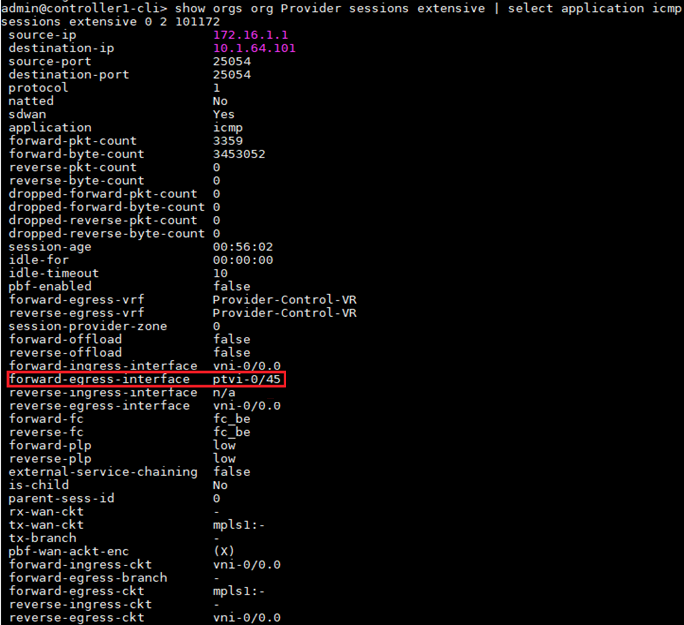
1.3 Check the IP Reachability between controller and branch
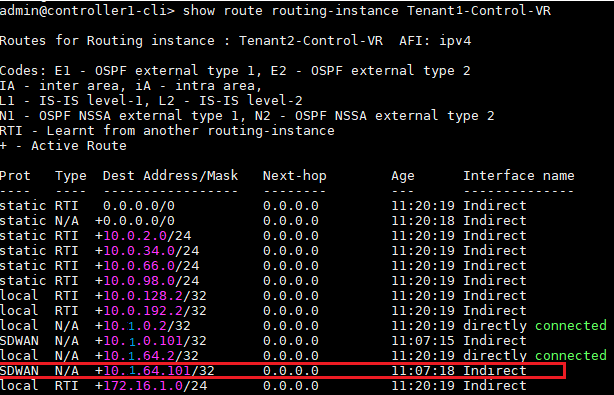
- Verify that branch management subnet is present in Tenant-Control-VR.
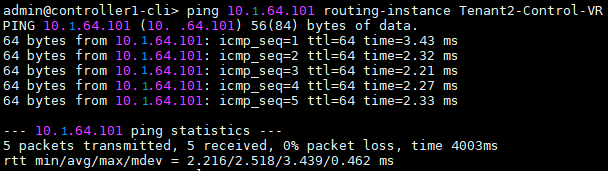
- Ping management IP address of the branch from the controller’s Tenant- control-VR and make sure it is reachable.
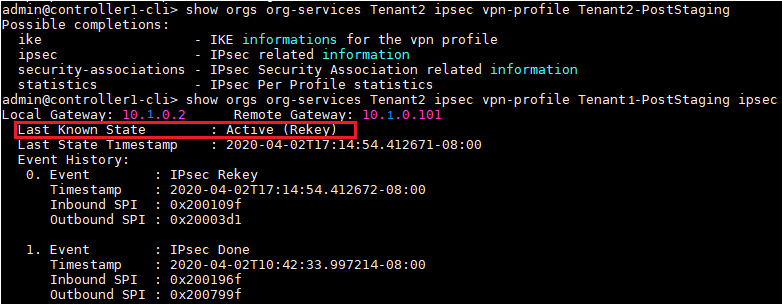
- If ping is not successful then, check the control protocol status between controller and branch. Please ensure that IPsec tunnel and BGP neighborship are established between controller and Branch. Troubleshooting IPsec/BGP issues is out of scope of this article.
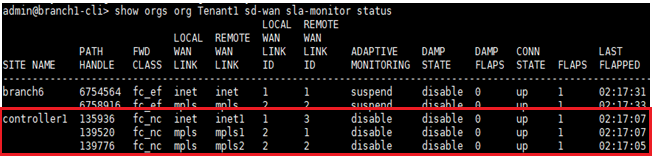
- Check SLA status between controller and branch. If SLA is down, refer this document - Troubleshooting SLA down issues between Branch to Branch.
- Please verify that ping packets are leaving out of controller by running tcpdump on controller WAN interface by matching the specific packet size. Make sure to include extra overhead added due to SDWAN encapsulations. From this point on, Ping packets will be encapsulated into VXLAN which can be identified using specific packet size.
tcpdump <wan interface> filter "'host <branch WAN IP address> greater 1000 and less 1200 -w inet.cpap'"
- Please verify the same at branch WAN interface to ensure VXLAN packets with specified size are arriving at the branch. Make sure you have reverse route present in Control-VR for the source director subnet.
tcpdump <wan interface> filter "'host <controller WAN IP address> greater 1000 and less 1200 -w mpls.cpap'"
Case2: Verify netconf/ssh on Director and Branch
2.1 Verify hash values of director and the branch.
- The outputs should match. If not, director and branch cannot communicate even if IP reachability exists.


2.2 Run a netconf-check.sh script on Director.
- Check if NetConf Port ( 2022 ) on appliance is reachable or not. At the end of the output, the test result will be printed. The result should ideally be “SUCCESS”.
admin@director1:~$ /opt/versa/vnms/scripts/netconf-check.sh 10.1.64.101 versa123
PING 10.1.64.101 (10.1.64.101) 56(84) bytes of data.
64 bytes from 10.1.64.101: icmp_seq=1 ttl=63 time=2.70 ms
64 bytes from 10.1.64.101: icmp_seq=2 ttl=63 time=1.44 ms
64 bytes from 10.1.64.101: icmp_seq=3 ttl=63 time=1.12 ms
--- 10.1.64.101 ping statistics ---
3 packets transmitted, 3 received, 0% packet loss, time 2003ms
rtt min/avg/max/mdev = 1.120/1.756/2.707/0.685 ms
Warning: Permanently added '[10.1.64.101]:2022' (RSA) to the list of known hosts.
<?xml version="1.0" encoding="UTF-8"?>
<hello xmlns="urn:ietf:params:xml:ns:netconf:base:1.0">
<capabilities>
<capability>urn:ietf:params:netconf:base:1.0</capability>
<capability>urn:ietf:params:netconf:base:1.1</capability>
===== SUCCESS: IPAddress and NetConf port is reachable and also able to do basic hand-shake====
2.3 Verify netconf/2022 is opened on Director and Branch
- There could be firewall that block the port. Need to verify that there is no middle device that blocks this port.
- Branch is listening for netconf port 2022. If the entry is not present, director won’t be able to establish netconf session with the branch.

2.4 Check vnf-manager configuration on Appliance.
- Director southbound ip address must be present in “vnf-manager ip-addresses” list otherwise netconf session will not establish.
- Also need to ensure relevant tvi interface is listed in “vnf-manager vnf-mgmt-interfaces”.

- You can check vmod.log file to check whether netconf session is landed on the branch or not.
2020-04-02 21:34:30.686 ALERT notif_read_cb: NETCONF session 114883 started
2020-04-02 21:34:30.841 ALERT oam_raise_config_change: Pending: Alarm found, Configuration changed : username (admin), context (netconf), time&date (Thu Apr 2 21:34:30 2020
)
2020-04-02 21:34:31.579 ALERT notif_read_cb: NETCONF session 114883 ended
2.5 Check services are running on the branch.
Please ensure all services are running on the branch, specifically monit for the netconf to work:
vsh status
2.6 You can enable netconf traces from director and at the branch to isolate the netconf issue further.
Note: Please remember to delete all trace commands once troubleshooting is done and the trace will be used for further review. It is suggested to enable trace logs with consultation with versa support.
- Following netconf trace command can be enabled to trace the netconf activity from director:
set devices global-settings trace pretty
set devices global-settings trace-dir /var/log/vnms/ncs
Note: Netconf trace will be created for the device under director /var/log/vnms/ncs/netconf-<device>.trace
- Following is the trace for netconf session where some qos configuration is pushed on the branch named as Hub-2.
admin@director1:/var/log/vnms/ncs$ tail -f netconf-Hub-2.trace
>>>>out 2-Apr-2020::07:12:06.922 device=Hub-2 session-id=113482
<rpc xmlns="urn:ietf:params:xml:ns:netconf:base:1.0"
message-id="4">
<edit-config xmlns:nc="urn:ietf:params:xml:ns:netconf:base:1.0">
<target>
<candidate/>
</target>
<test-option>test-then-set</test-option>
<error-option>rollback-on-error</error-option>
<config>
<orgs xmlns="http://www.versa-networks.com/org">
<org-services>
<name>Tenant-1</name>
<class-of-service xmlns="http://www.versa-networks.com/class-of-service">
<qos-profiles>
<qos-profile>
<name>test</name>
<dot1p-rw-enable>no</dot1p-rw-enable>
<loss-priority>low</loss-priority>
<dscp-rw-enable>yes</dscp-rw-enable>
<peak-kbps-rate>10000</peak-kbps-rate>
<forwarding-class>fc_nc</forwarding-class>
</qos-profile>
</qos-profiles>
</class-of-service>
</org-services>
</orgs>
</config>
</edit-config>
</rpc>
- Following commands should be enabled on branch appliance to trace the netconf activity:
set confdConfig logs confdLog enabled
set confdConfig logs developerLog enabled
set confdConfig logs developerLogLevel trace
set confdConfig logs netconfLog enabled
set confdConfig logs netconfTraceLog enabled
Case3: Contact Support
Capture Logs all above outputs and contact Versa Support.
NOTE: Log the putty/terminal session to capture all outputs when performing requested steps, will be helpful when engaging Support.