This article explains the various menu options available during the ISO installation of VA (Versa Analytics) on Versa CSG and certified Whitebox appliances using USB.
Different devices require different minimum VA versions.
Different devices have different display options (VGA/KVM/Serial), boot mode options, and methods for BIOS setup and boot order. Please select the installer menu item based on the device model and boot mode, as described below.
Note: The actual installer menu may have fewer items or more items depending on the VA version/build. The below options are from VOS version 22.1.4+.
Boot Mode : Legacy : Installer Menu:
boot:
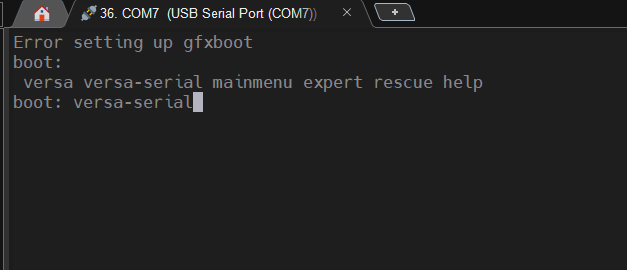
versa versa-serial mainmenu expert rescue help
boot: versa-serial
Boot Mode : UEFI : Installer Menu:
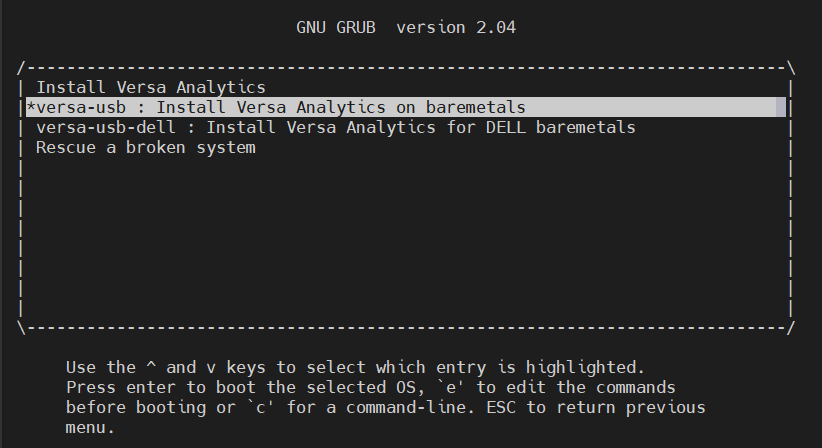
VA Installer Menu selection
The table below lists the appliance model numbers along with the corresponding boot mode and the installer menu item to be used during ISO installation.
Vendor : Versa Networks, Inc. | ||||||
| Vendor Model | Installer Menu selection | Boot Mode (Default) | Display (Serial/VGA) | wsm/ non-wsm | FIPS support | Link to Versa Certified Appliance Guide |
| CSG700/700R | versa-serial | Legacy/BIOS | Serial | wsm | Not supported | https://support.versa-networks.com/support_home?id=kb_article_view&sys_kb_id=5222a47087428b10389dedf50cbb3589 |
| CSG300 | versa-serial | Legacy/BIOS | Serial | wsm | Not supported | https://support.versa-networks.com/support_home?id=kb_article_view&sys_kb_id=a622a47087428b10389dedf50cbb3591 |
| CSG1300 | versa-serial | Legacy/BIOS | Serial | wsm | Not supported | https://support.versa-networks.com/support_home?id=kb_article_view&sys_kb_id=fe22e47087428b10389dedf50cbb35d8 |
| CSG1500 | versa-serial | Legacy/BIOS | Serial | non-wsm | Not Supported | https://support.versa-networks.com/support_home?id=kb_article_view&sys_kb_id=3622e47087428b10389dedf50cbb35e1 |
| CSG2500 | versa-serial | Legacy/BIOS | Serial | non-wsm | Not Supported | https://support.versa-networks.com/support_home?id=kb_article_view&sys_kb_id=5ddf183c87ce4b10389dedf50cbb3591 |
| CSG5000 | versa-serial | Legacy/BIOS | Serial | non-wsm | Not Supported | https://support.versa-networks.com/support_home?id=kb_article_view&sys_kb_id=e622e47087428b10389dedf50cbb3592 |
| CSG150 | versa--USB | UEFI/GPT | Serial | wsm | Not supported | https://support.versa-networks.com/support_home?id=kb_article_view&sys_kb_id=4322287087428b10389dedf50cbb354d |
| CSG5200 | versa--USB | UEFI/GPT | Serial | non-wsm | Not Supported | https://support.versa-networks.com/support_home?id=kb_article_view&sys_kb_id=f322687087428b10389dedf50cbb35b8 |
Vendor : Dell | ||||||
| Vendor Model | Installer Menu selection | Boot Mode (Default) | Display (Serial/VGA) | wsm/ non-wsm | FIPS Support | Link to Versa Certified Appliance Guide |
| VEP14x5 | versa-serial | Legacy/BIOS | Serial | wsm | Not supported | https://support.versa-networks.com/support_home?id=kb_article_view&sys_kb_id=0102603087428b10389dedf50cbb351c |
| VEP1420 | versa--USB | UEFI/GPT | Serial | wsm | Not supported | https://support.versa-networks.com/support_home?id=kb_article_view&sys_kb_id=1d02603087428b10389dedf50cbb358b |
| VEP-4600-V910/V930 | versa-serial | Legacy/BIOS | Serial | non-wsm | Not Supported | https://support.versa-networks.com/support_home?id=kb_article_view&sys_kb_id=6802203087428b10389dedf50cbb359e |
| R7515-V2800 | versa--USB | UEFI/GPT | Serial | non-wsm | Not Supported | https://support.versa-networks.com/support_home?id=kb_article_view&sys_kb_id=1502603087428b10389dedf50cbb355e |
| R7615-V2900 | versa-usb-dell | UEFI/GPT | VGA/KVM | non-wsm | Supported | https://support.versa-networks.com/support_home?id=kb_article_view&sys_kb_id=c102603087428b10389dedf50cbb3524 |
| XR5610-V950 | versa--USB | UEFI/GPT | Serial | non-wsm | Supported | https://support.versa-networks.com/support_home?id=kb_article_view&sys_kb_id=5432a87087428b10389dedf50cbb35a8 |