Versa 1xx-NW-FWA-1010VC
This section explains the specifications of Versa 1xx-NW-FWA-1010VC.
This is the front view of Versa 1xx-NW-FWA-1010VC
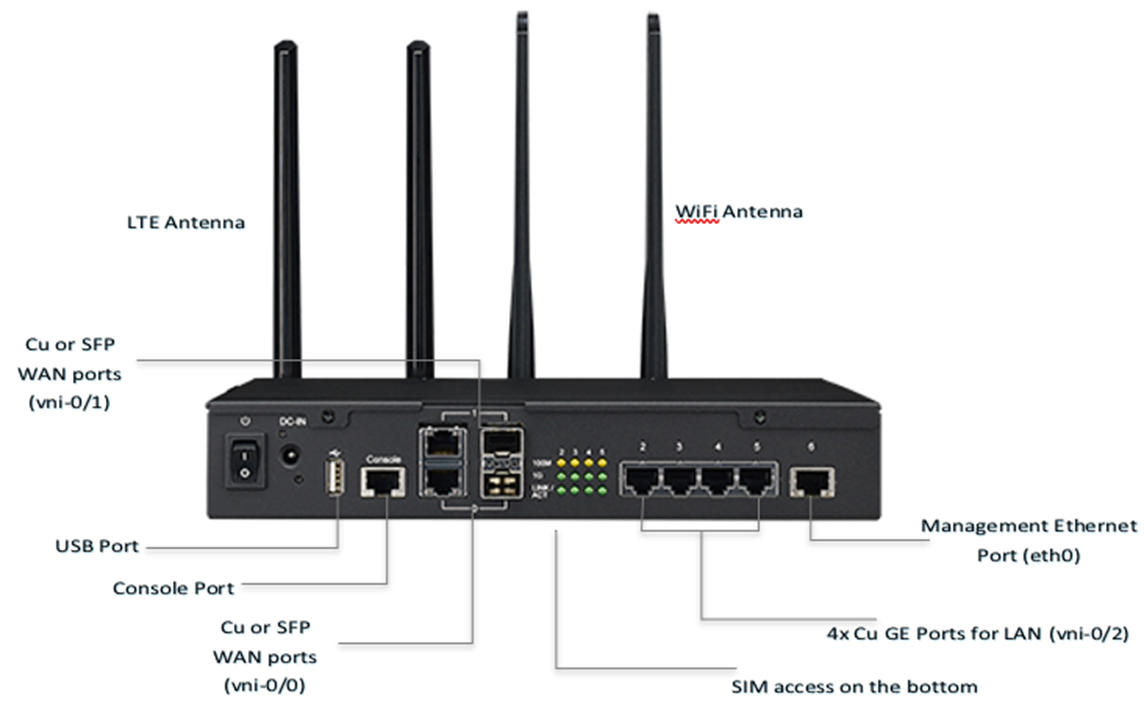
This is the rear view of Versa 1xx-NW-FWA-1010VC
Platform Specifications
This table provides the platform specifications of Versa 1xx-NW-FWA-1010VC.
| Versa Models | Versa-100-NW, Versa-110-NW, Versa-120-NW |
| Vendor Models | Versa-100-NW: Advantech 1010VC-00E, Versa-110-NW: Advantech 1010VC-01E, Versa-120-NW: Advantech 1010VC-02E |
| Performance | Versa-100-NW: 250 Mbps+ (*) Versa-110-NW: 500 Mbps+ (*) Versa-120-NW: 1.5 Gbps+ (*) |
| Processor & Memory | Versa-100-NW: Intel C2358 2-Core CPU @1.7 GHz, 4 GB ECC DRAM Versa-110-NW: Intel C2558 4-Core CPU @2.4 GHz, 8 GB ECC DRAM Versa-120-NW: Intel C2758 8-Core CPU @2.4 GHz, 16 GB ECC DRAM |
| Encryption Assist in Hardware | Built-in Quick-Assist support |
| Built-in Interfaces | WAN: 2x Cu or SFP dual media capable interfaces LAN: 4x Cu GE switched LAN interfaces (served by Marvell 88E6141 unmanaged switch connected with 1x GE uplink to Atom CPU complex) |
| Wireless Interfaces | Built-in LTE and / or WiFi Interface Options LTE SIM Card externally accessible |
| Other Interfaces | Management: 1x Cu GE; Console: RJ45; Other: 1x USB ports |
| Storage | Versa-100-NW: 64 GB SSD, Versa-110-NW: 64 GB SSD, Versa-120-NW: 128 GB SSD |
| TPM | Yes |
| PSU | 60W External PS, 100-240VAC input |
| Cooling | Cooled by 1x Smart Fan |
| Enclosure | Desktop size unit; wall-mount, rack-mount and desk-mount options |
| MTBF | 325,000 hrs |
| Certification | EMC ClassB, CB ClassB, UL, LVD, CCC, RoHS, REACH, R&TTEP4, FCCP4 |
NOTE: (*) Routing, Forwarding, Layer 7 application aware traffic steering, Nextgen Firewall, URL Filtering. Testing done with UDP traffic (RFC 2544 test with 0.1% acceptable loss ratio), 1024 sessions with application offload, vxlan-entropy, and isolcpu options enabled. Encryption used for testing is AES128-GCM. Performance includes aggregate of ingress and egress traffic.
Module Options
This table provides the module options of Versa 1xx-NW-FWA-1010VC.
| LTE Options | AMER, EMEA: Sierra Wireless MC7455 APAC: Sierra Wireless MC7430 |
| Carrier Networks | AMER, EMEA: AT&T, Bell, Rogers, Sprint, Telus, Verizon APAC: docomo, Telstra, Planned: KDDI, Softbank |
| Performance | Category-6 (peak down-link: 300 Mbps, up-link: 50 Mbps) |
| Wireless Standards | 4G-LTE, 3G (WCDMA) Frequency Bands: MC7455: B1, B2, B3, B4, B5, B8 Frequency Bands: MC7430: B1, B5, B6, B8, B9, B19 |
| Geo-Location | GPS, Glonass, Beidou, Galileo |
| FRU | No (internal modem) |
| WiFi Option | Azurewave AW-CB178NF |
| Wireless Frequencies | 2.4 GHz, 5 GHz |
| Wireless Standards | 802.11a/b/g/n/ac, WLAN AP capable |
| Bluetooth | Integrated – Bluetooth v4.2 |
| Encryption | WPA/WPA2, WEP 64-bit /128-bit encryption, IEEE 802.11i security standard via Advanced Encryption Standard (AES) / Counter Mode CBC-MAC Protocol (CCMP), Temporal Key Integrity Protocol (TKIP), Advanced Encryption Standard (AES) / Cipher-Based Message Authentication Code (CMAC), and WLAN Authentication and Privacy Infrastructure (WAPI) security mechanisms. |
| Antenna | 2T2R MIMO supported, up to 867Mbps throughput |
| FRU | No (internal modem) |
LTE Configuration and Verification
Follow these steps to configure and verify the LTE:
- After installing Versa FlexVNF, run cli command to enter the CLI mode.
[admin@versa-flexvnf: ~] # cli

       .---.,
            (      ``.
       _     \        )    __      ________ _____   _____
      (  `.   \      /     \ \    / /  ____|  __ \ / ____|  /\
       \    `. )    /       \ \  / /| |__  | |__) | (___   /  \
        \     |    /         \ \/ / |  __| |  _  / \___ \ / /\ \
         \    |   /           \  /  | |____| | \ \ ____) / ____ \
          \   |  /             \/   |______|_|  \_\_____/_/    \_\
           \  | /
            \_|/                   _  _ ___ _______      _____  ___ _  _____
                                  | \| | __|_   _\ \    / / _ \| _ \ |/ / __|
                                  | .` | _|  | |  \ \/\/ / (_) |   / ' <\__ \
                                  |_|\_|___| |_|   \_/\_/ \___/|_|_\_|\_\___/


admin connected from 10.42.107.254 using ssh on versa-flexvnf
admin@versa-flexvnf-cli>
- Run the config CLI command to enter the configuration mode.
admin@versa-flexvnf-cli> config
Entering configuration mode private

[ok][2018-03-12 10:37:59]

[edit]
admin@versa-flexvnf-cli(config)%
- Run the run show interface brief CLI command to verify the interfaces in the output.
admin@versa-flexvnf-cli(config)% run show interfaces brief
NAME       MAC                OPER  ADMIN  TENANT  VRF     IP
----------------------------------------------------------------------------
eth-0/0    00:0b:ab:f5:9e:e2  up    up     0       global  10.42.145.70/20
vni-0/0    00:0b:ab:f5:9e:df  down  down   -       -
vni-0/1    00:0b:ab:f5:9e:e1  down  down   -       -
vni-0/100  02:aa:bb:cc:dd:01  down  down   -       -
vni-0/101  02:aa:bb:cc:dd:02  down  down   -       -
vni-0/102  02:aa:bb:cc:dd:03  down  down   -       -
vni-0/103  02:aa:bb:cc:dd:04  down  down   -       -
vni-0/2    00:0b:ab:f5:9e:e0  down  down   -       -
vni-0/200  f0:03:8c:b8:ab:00  down  down   -       -
vni-0/201  f0:03:8c:b8:ab:10  down  down   -       -
vni-0/202  f0:03:8c:b8:ab:20  down  down   -       -
vni-0/203  f0:03:8c:b8:ab:30  down  down   -       -

[ok][2018-03-12 10:47:04]

[edit]
admin@versa-flexvnf-cli(config)%
- Run these CLI commands to enable DHCP on the USB port after connecting LTE Dongle:
-
set interfaces vni-0/100 enable true
- set interfaces vni-0/100 unit 0 vlan-id 0
- set interfaces vni-0/100 unit 0 enable true
- set interfaces vni-0/100 unit 0 family
-
set interfaces vni-0/100 unit 0 family inet
-
set interfaces vni-0/100 unit 0 family inet dhcp
admin@versa-flexvnf-cli(config)% set interfaces vni-0/100 unit 0 family inet dhcp
[ok][2018-03-12 10:48:39]

[edit]
-
- Run the commit CLI command to save the interface configuration and enable the configuration changes.
admin@versa-flexvnf-cli(config)% commit
Commit complete.
[ok][2018-03-12 10:48:41]

[edit]
admin@versa-flexvnf-cli(config)%
- Run the run show interfaces brief CLI command to verify whether the LTE interface has obtained an IP address from the service provider.
admin@versa-flexvnf-cli(config)% run show interfaces brief
NAME         MAC                OPER  ADMIN  TENANT  VRF     IP
--------------------------------------------------------------------------------
eth-0/0      00:0b:ab:f5:9e:e2  up    up     0       global  10.42.145.70/20
vni-0/0      00:0b:ab:f5:9e:df  down  down   -       -
vni-0/1      00:0b:ab:f5:9e:e1  down  down   -       -
vni-0/100    02:aa:bb:cc:dd:01  up    up     -       -
vni-0/100.0  02:aa:bb:cc:dd:01  up    up     0       global  100.81.114.191/25
vni-0/101    02:aa:bb:cc:dd:02  down  down   -       -
vni-0/102    02:aa:bb:cc:dd:03  down  down   -       -
vni-0/103    02:aa:bb:cc:dd:04  down  down   -       -
vni-0/2      00:0b:ab:f5:9e:e0  down  down   -       -
vni-0/200    f0:03:8c:b8:ab:00  down  down   -       -
vni-0/201    f0:03:8c:b8:ab:10  down  down   -       -
vni-0/202    f0:03:8c:b8:ab:20  down  down   -       -
vni-0/203    f0:03:8c:b8:ab:30  down  down   -       -

[ok][2018-03-12 10:49:58]

[edit]
admin@versa-flexvnf-cli(config)%
-
Run these CLI commands if the operator shares the username/password of the APN:
-
set interfaces vni-0/101 wwan username 122313213@revb.tvls
- set interfaces vni-0/101 wwan password 123442324
NOTE:- Interface vni-0/100 to vni-0/103 reserved for LTE, and vni-0/200 to vni-0/207 reserved for Wi-Fi.
-
From Versa Director Rel 16.1-S5 onwards, the default post staging templates are created using vni- 0/0, vni-0/1 etc. The LTE dongle is supported by interfaces vni-0/100 to vni-0/103.
-
Select Administration > SD-WAN > Templates > edit to export your current template. This replaces your corresponding WAN side vni interface to vni-0/100.
-
- Import the template using the edited file.
-
Run the staging.py command with -w 100 -d or -w 101 -d option to use the vni-100 in WAN for LTE and DHCP.
NOTE: You do not have to change the template for LTE in a private build.
-
Run these CLI commands after inserting the dongle in the Versa FlexVNF USB slot. The Versa FlexVNF auto detects the IP address.
-
show interfaces detail vni-0/100
- show interfaces wwan status brief
- show interfaces wwan status carrier-brief | tab
- show interfaces wwan status cell-location
-
APN Configuration
Follow these steps to configure an APN:
-
Run the set interfaces vni-0/100 wwan CLI command to configure the wireless WAN.
Example -
Run the show interfaces wwan status brief CLI command to view the wwan status.
Example -
Run the show interfaces wwan status carrier-brief|tab CLI command to view the modems connectivity status.
Example -
Run the show interfaces detail vni-0/100 CLI command to view the interface details.
Example - Run the show interface wwan status cell-location CLI command to the cell location details.
Example
Wi-Fi Configuration
Follow these steps to configure the wifi in a private build:
-
Run these CLI commands to configure the access point.
-
set interfaces vni-0/200 enable true
-
set interfaces vni-0/200 unit 0 vlan-id 0
-
set interfaces vni-0/200 unit 0 enable true
-
set interfaces vni-0/200 unit 0 family
-
set interfaces vni-0/200 unit 0 family inet
-
set interfaces vni-0/200 unit 0 family inet address 172.18.166.1/24
-
set interfaces vni-0/200 access-point ssid-name VOIP-WIFI
-
set interfaces vni-0/200 access-point frequency 2.4-GHz
-
set interfaces vni-0/200 access-point broadcast-ssid true
-
set interfaces vni-0/200 access-point maximum-clients 5
-
set interfaces vni-0/200 access-point wpa-password versa123
-
set interfaces vni-0/200 access-point security-mode wpa2-psk
-
-
Run these CLI commands to configure the WLAN on the device:
-
set wlan wlan-2.4GHz regulatory-country country-name "US-United States"
-
set wlan wlan-2.4GHz regulatory-country wireless-protocol n-2.4GHz
-
set wlan wlan-2.4GHz regulatory-country channel auto
-
-
Run the show wlan AP-status CLI commands on the branch to view the wifi configuration details:
-
Run the show wlan client-status CLI command to view the client’s device status.