BGP L3VPN Route Filtering
Run the show route table l3vpn.ipv4.unicast routing-instance Provider-1-sub-org-1-Control-VR receive-protocol bgp 171.20.20.0/24 CLI command to filter L3VPN routes in BGP.
admin@CPE1-cli> show route table l3vpn.ipv4.unicast routing-instance Provider-1-sub-org-1-Control-VR receive-protocol bgp 171.20.20.0/24

Routes for Routing instance : Provider-1-sub-org-1-Control-VR  AFI: ipv4

Routing entry for 171.20.20.0/24
Peer Address       : 10.1.64.1
Route Distinguisher: 3L:3
Next-hop           : 10.1.64.102
VPN Label          : 25728
Local Preference   : 110
AS Path            : N/A
Origin             : Igp
MED                : 0
Community          : [ 8009:8009 ]
Extended community : [ target:3L:3 ]
Preference         : Default
Question: How to filter BGP L3VPN route?
Answer:
Creating a Prefix List to Match the Specific Route
Follow these steps to create a prefix list to match the specific route:
- In the Versa Director, Select an appliance > Configuration > Networking > Virtual Routers > Tenant Control-VR
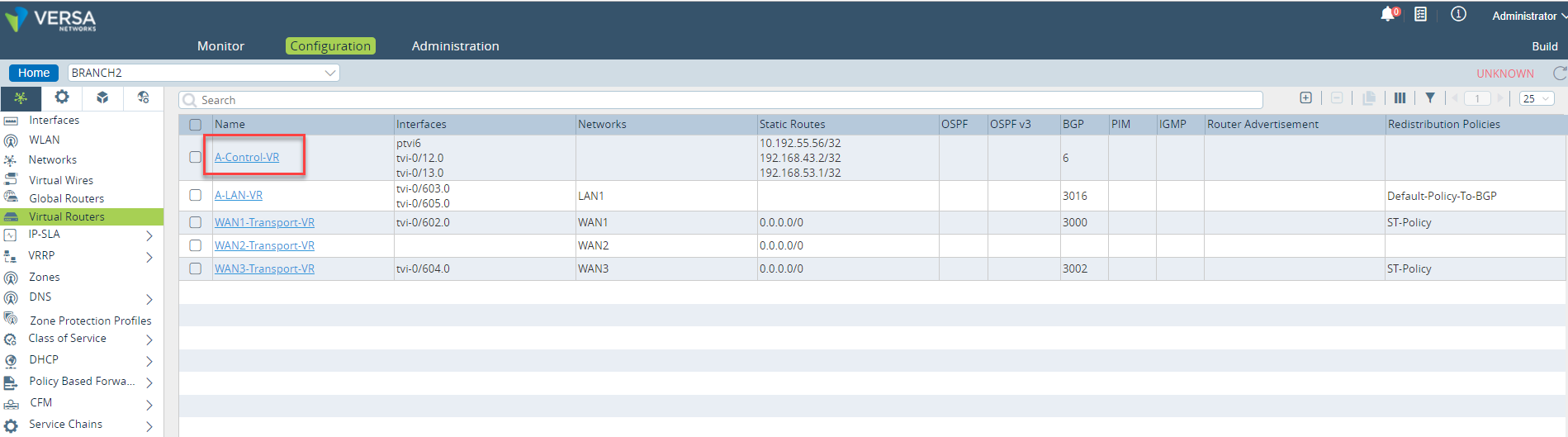
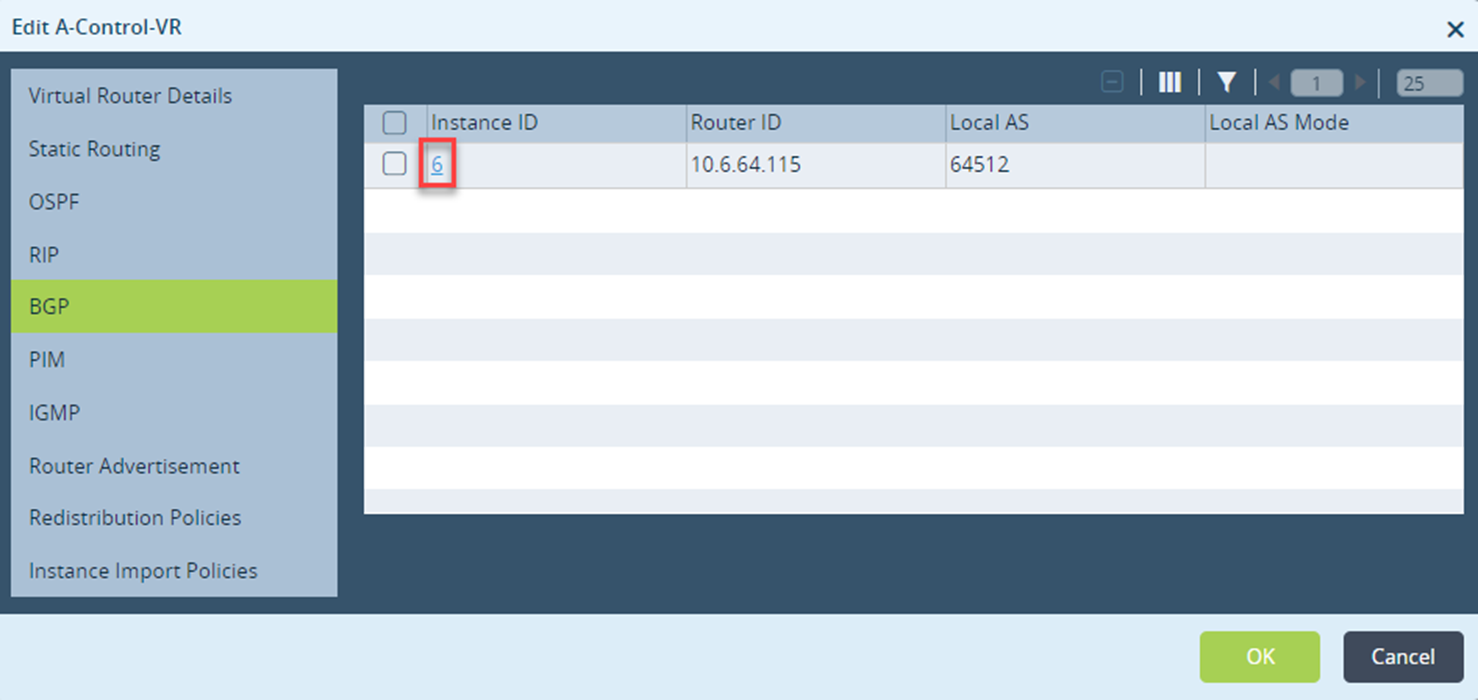
- Select BGP and click the Instance ID <6>.
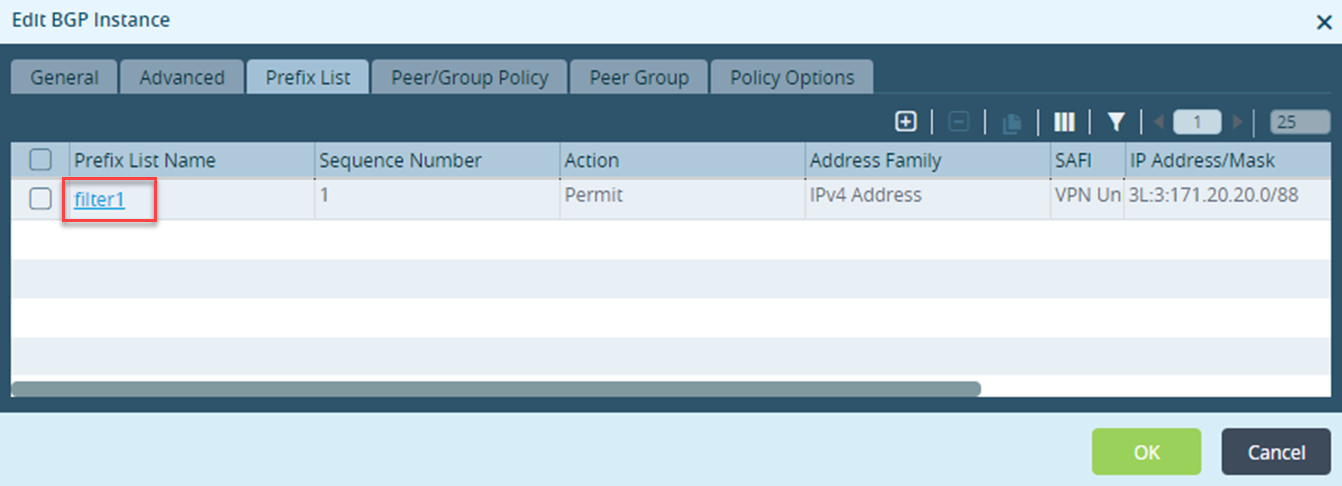
- select Edit BGP Instance > Prefix List tab and click <filter1>.
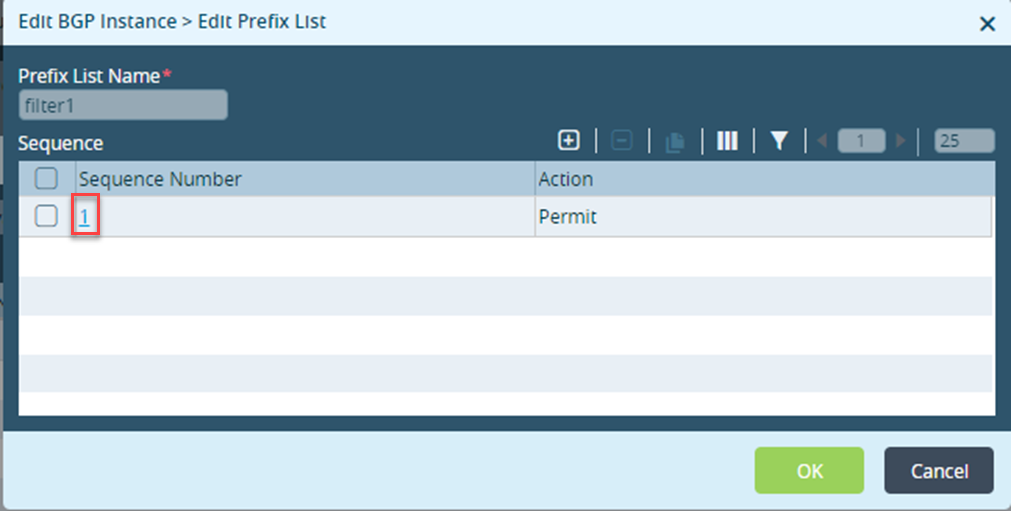
Select Edit BGP Instance > Edit Prefix List > Sequence Number <1>.
Select Edit BGP Instance > Edit Prefix List > Edit Sequence to match L3VPN prefix in <route-distinguisher>:<IPv4 prefix>/<prefix-length> format.
Note: You need to configure the prefix-length with respective of L3VPN(64+IPv4 Mask)
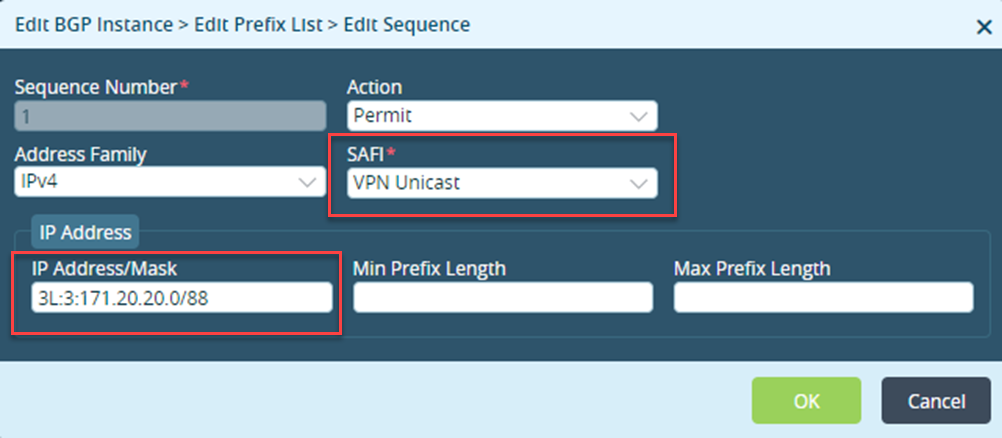
Configuring a Peer/Group Policy to Reject the L3VPN Prefixes
Follow these steps to configure the peer/group policy to reject the L3VPN prefixes which matches with the prefix list created earlier, refer Creating a Prefix List to Match the Specific Route.
- In the Versa Director, select an appliance > Configuration > Networking > Virtual Router > Tenant Control-VR > BGP > Peer/Group Policy > Peer/Group Policy Name <Import-From-SDWAN-policy>.
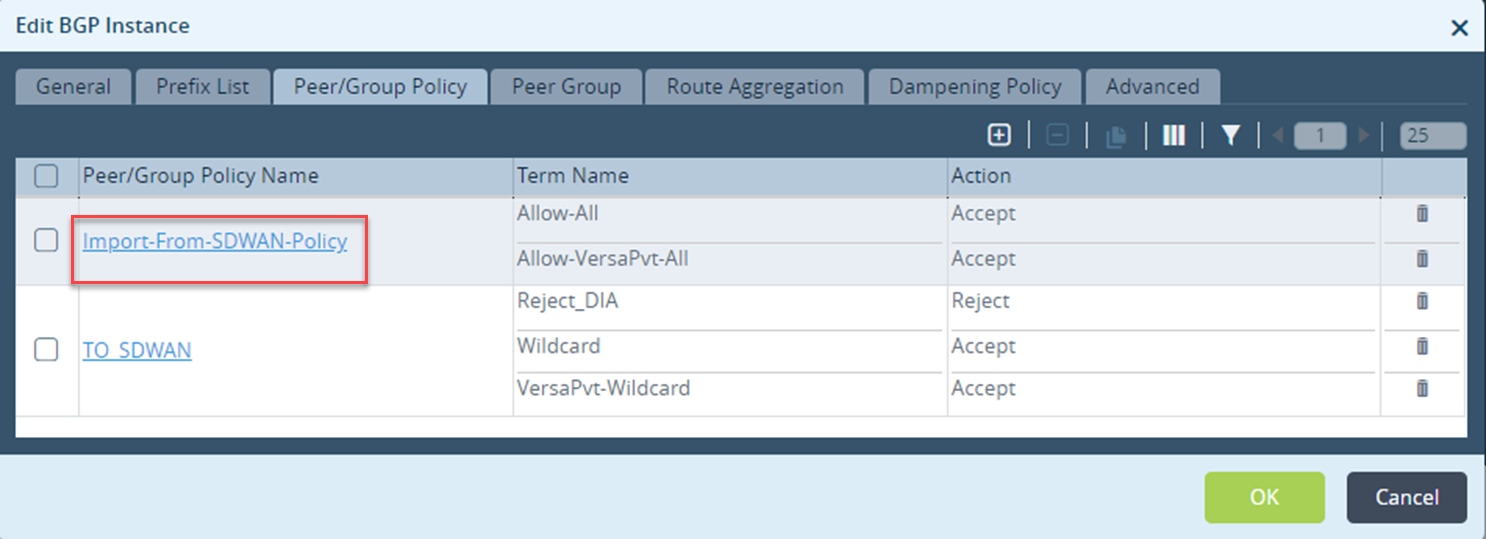
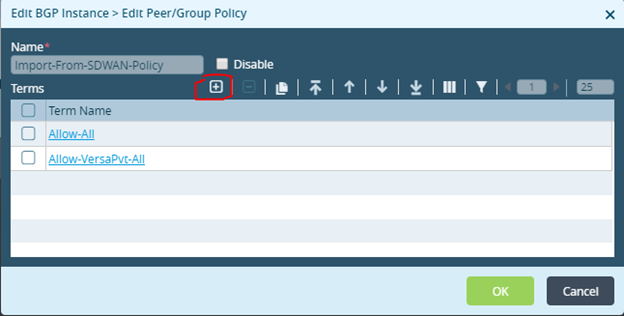
- Select Edit BGP Instance > Edit Peer/Group Policy and click
 .
.
- Select BGP Instance > Add Peer/Group Policy > Add Term and select IPv4-VPN Family from Family drop-down menu and select the prefix list created above (filter1) from the NLRI drop-down menu and click OK.
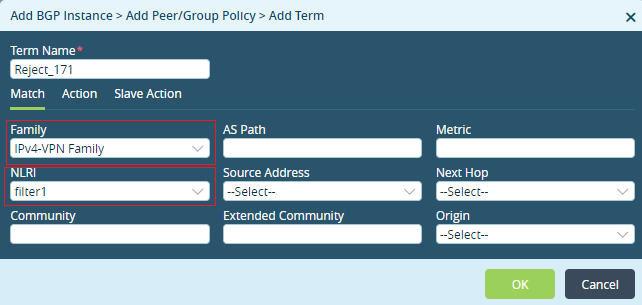
- Select EditBGP Instance > Edit Add Peer/Group Policy > Edit Add Term > Action tab and select Reject from Accept/Reject drop-down menu and click OK.
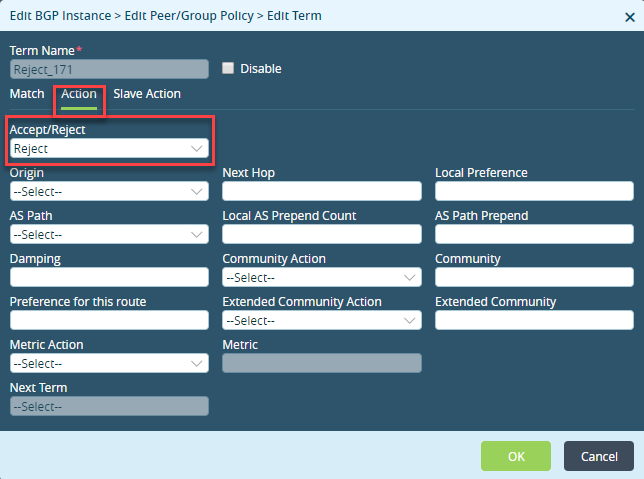
- Select Edit BGP instance > Edit Peer/Group Policy and select Reject 171 and click
 to move the new term to the top of the Term Name list.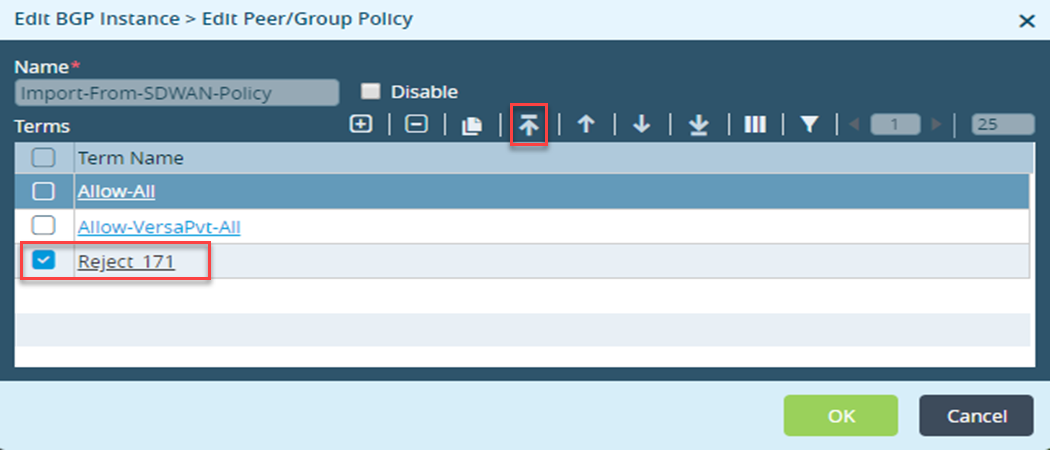
Creating a Prefix List to Match the Specific Route Using CLI
Run these CLI commands to create a prefix list to match the specific route using CLI.
admin@CPE1-cli(config-bgp-2)% show prefix-list filter1 | display set
set routing-instances Provider-1-sub-org-1-Control-VR protocols bgp 2 prefix-list filter1 seq 1 permit
set routing-instances Provider-1-sub-org-1-Control-VR protocols bgp 2 prefix-list filter1 seq 1 address-family ipv4 vpn-unicast address-mask 3L:3:171.20.20.0/88
Configuring a Peer/Group Policy to Reject the L3VPN Prefixes Using CLI
Run these CLI commands to configure a peer/group policy to reject L3VPN prefixes using CLI.
admin@CPE1-cli(config-bgp-2)% show routing-peer-policy Import-From-SDWAN-Policy | display set
set routing-instances Provider-1-sub-org-1-Control-VR protocols bgp 2 routing-peer-policy Import-From-SDWAN-Policy term Reject_171 match family inet-vpn
set routing-instances Provider-1-sub-org-1-Control-VR protocols bgp 2 routing-peer-policy Import-From-SDWAN-Policy term Reject_171 match ip nlri prefix-list filter1
set routing-instances Provider-1-sub-org-1-Control-VR protocols bgp 2 routing-peer-policy Import-From-SDWAN-Policy term Reject_171 action reject
set routing-instances Provider-1-sub-org-1-Control-VR protocols bgp 2 routing-peer-policy Import-From-SDWAN-Policy term Allow-All action accept
set routing-instances Provider-1-sub-org-1-Control-VR protocols bgp 2 routing-peer-policy Import-From-SDWAN-Policy term Allow-All action community 8009:8009
set routing-instances Provider-1-sub-org-1-Control-VR protocols bgp 2 routing-peer-policy Import-From-SDWAN-Policy term Allow-All action community-action set-specific
set routing-instances Provider-1-sub-org-1-Control-VR protocols bgp 2 routing-peer-policy Import-From-SDWAN-Policy term Allow-VersaPvt-All match family versa-private
set routing-instances Provider-1-sub-org-1-Control-VR protocols bgp 2 routing-peer-policy Import-From-SDWAN-Policy term Allow-VersaPvt-All action accept
Verification
Run the show route table l3vpn.ipv4.unicast routing-instance Provider-1-sub-org-1-Control-VR receive-protocol bgp 171.20.20.0/24 CLI command to check the route in tenant control-vr L3VPN route and the route is no longer exist in the routing table.
