Overview
Titan backup is enabled only on the following Manager-0 nodes:
- MS-016-TITAN-JAPAN-MANAGER-0
- MS-017-TITAN-FRANKFURT-MANAGER-0
- MS-013-TITAN-GLOBAL-MANAGER-0
Backup Script Details
- Script Path: /opt/versa/backup/MS-Backup/titan-backup-script.sh
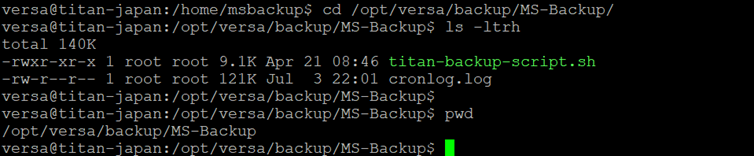
- Automatic Execution Method: The script runs twice a day via a cron job.
- Verification: Use the following command to verify the cron job:
- sudo crontab -l
- Backup Storage Path: /home/msbackup
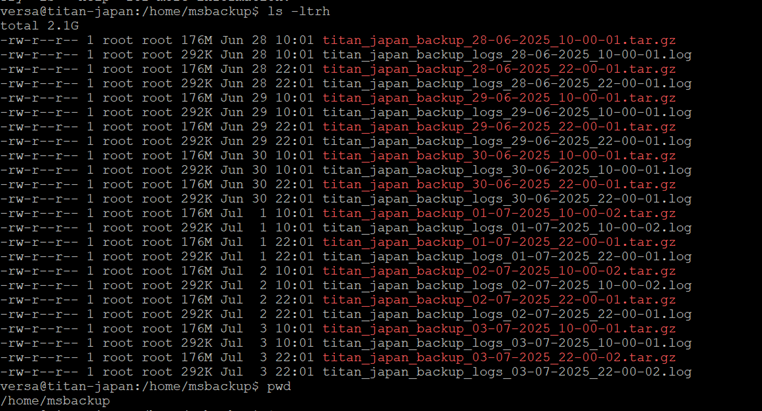
- Retention: The device retains the last 10 days of backups. Older backups are automatically deleted using a separate cron job.
Manual Backup Procedure (If Auto Backup Fails):
Step 1: Log in to the Titan Node (Manager-0)
SSH into the appropriate Manager-0 node.
Step 2: Navigate to the Backup Script Directory
cd /opt/versa/backup/MS-Backup/
ls -ltrh
Locate the file: titan-backup-script.sh

Step 3: Run the Backup Script with Sudo Permissions
sudo ./titan-backup-script.sh
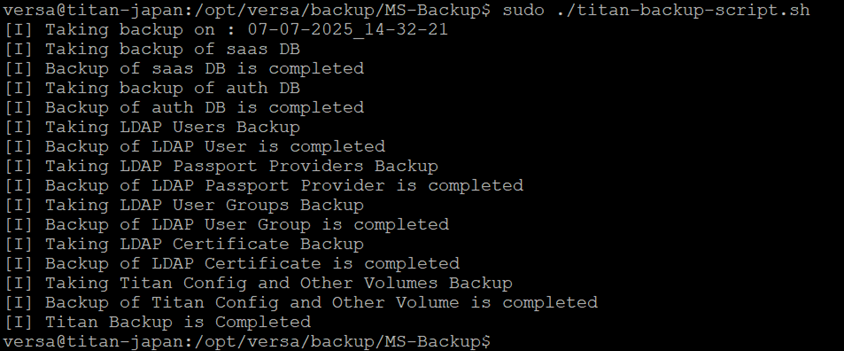
Step 4: Verify the Backup Files
Navigate to the backup directory:
cd /home/msbackup/
ls -ltrh
You will see two files:
- “.tar.gz” file – this is the actual backup archive.
- “.log” file – contains the script execution log. Review this file for any errors.

Step 5: Transfer Backup to Backup Server :
Use scp to move the backup to a backup server:
scp /home/msbackup/<backup-filename>.tar.gz user@<backup-server-ip>:/Backup/Titan/<Titan node>/<Date>
Example:
scp /home/msbackup/<backup-filename>.tar.gz user@<backup-server-ip>:/Backup/Titan/ MS-013-TITAN-GLOBAL-MANAGER-0/02_JUL_2025/
Note
Always ensure that the Manager-0 node has sufficient disk space before running the manual backup. Periodically monitor cron job execution and logs to ensure backup health.