We have seen this issue with some customer devices when try to change wan ip from DHCP to static from dashboard but failed with error “invalid Request”.
Also below error logs will be seen in versa_device_facing_api.log of titan nodes.
Oct 1 02:12:05 titan-node-california-1 device_facing_api/versa_device_facing_api:1.3R7S3.2/aba93efbed2d[25017] [2020-10-01 06:12:05,778] [DEBUG] [PUT] [module=versa.views.Device.config] [function=versa.controller.VersaDeviceController.push_service_config_director] [Director_IP=43.254.43.17 Provider_Org=Provider Tenant_Org=FamilyMart User=admin Payload={'hubSecondary': [], 'provider': 1, 'sites': {'zipcode': '12810', 'siteName': 'FMI-Casablanca-Abdulah', 'status': True, 'email': None, 'country': 'Indonesia', 'siteId': 132, 'state': 'DKI Jakarta', 'address': 'Jl. Jl.KH.Abdullah Syafei\u2019 Kav.27 Tebet, Tebet, Jakarta Selatan, DKI Jakarta', 'latitude': -6.22484, 'longitude': 106.8511, 'numberOfDevices': 1, 'devices': [{'addons': {'expiredOn': '2023-07-29T10:26:09.350000Z', 'subscription': 1095, 'services': ['cgnat', 'sdwan', 'nextgen-firewall', 'dns-proxy']}, 'deviceGroup': '', 'deviceType': 'csg700', 'hasAddons': True, 'deviceName': 'FamilyMart-132', 'cloudSettings': {'aws': {}, 'openstack': {}, 'azure': {}}, 'vdsoftwareversion': '20.2.2', 'isAutoRenewal': False, 'expiredOn': '2023-09-10T19:47:16.560000Z', 'installMethod': 'urlztp', 'isCustomConfigured': False, 'deviceUID': 227, 'isDeployed': True, 'role': 'Spoke', 'mode': {'peerDeviceId': None, 'peer': None, 'type': 'single'}, 'installMethods': ['gztp', 'urlztp', 'ble'], 'minimumImageVersion': '20.2.2', 'deviceSerialNumber': 'JAB20054409', 'deviceModel': 'CSG730', 'deviceSoftware': '16.1R2S9.1', 'serviceConfigs': {'updated': {'Interfaces': {'WAN': [{'VLANId': 0, 'services': {'ipsec': []}, 'role': 'primary', 'function': 'split', 'description': 'WAN2', 'addressV4': {'address': '101.255.103.2/30', 'DNSPrimary': '8.8.8.8', 'staticRoute': [], 'gateway': '101.255.103.1', 'DNSSecondary': '8.8.4.4', 'origin': 'static'}, 'enabled': True, 'MTU': 1500, 'interfaceType': 'WAN', 'gateway': False, 'transport': {'name': 'Internet', 'pppoe': {'interfaces': [], 'enabled': False}, 'password': None, 'peerAs': None, 'neighbourPeerIP': None}, 'port': 2, 'APN': None}]}
Response_Code=409 Response_Message=Error while pushing restconf config: malformed-message => unknown element: name-server in /ncs:devices/ncs:device[ncs:name='FamilyMart-172']/ncs:config/system:system/system:name-server]
From the logs we can see deviceSoftware': '16.1R2S9.1.
In VD, DNS namespace YANG changed between S9 and S11 and above, hence in titan we control the same by a field called 'deviceSoftware’
Steps to fix issue
===============
1.Check if device is online in VD
2.Check version running on device.
If VD is running 20.2.2 and appliance on older version (here in familyMart this device on S9.1) then we need to upgrade the device to 20.2.2 after getting MW from customer.
Commit push is failing to appliance because VD try to push 20.2.2 specific config to appliance in older version
3.Once the device upgraded and online in VD check device status in dashboard (both in configure and monitor page)
4.In monito page select appliance and click on “Monitoring Dashboard”
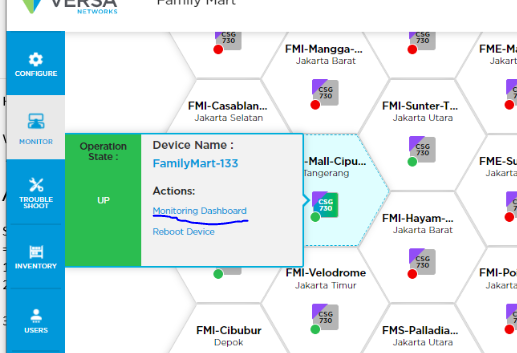
Then refresh
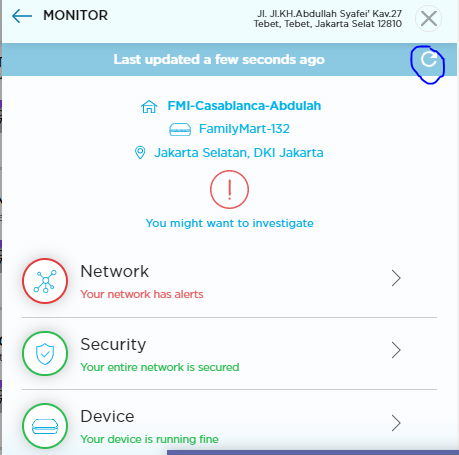
5.Now we can do the config changes from dashboard
In case you are seeing device already upgraded to 20.2.2 but still getting similar error in logs.Check deviceSoftware in logs.If it is showing old version (S9.1) means Titan DB didn’t updated new version of appliance.Then need to follow
Steps 3,4,5 from above mentioned to fix.
NOTE:When ever there is device software version upgrade titan Db will automatically update with same .Below are few ways DB gets updated automatically .
a. Interface flop
b. Interface changes from WAN to static
c. Any analytics log related to interface
d. If user tries to get the latest status by doing refresh