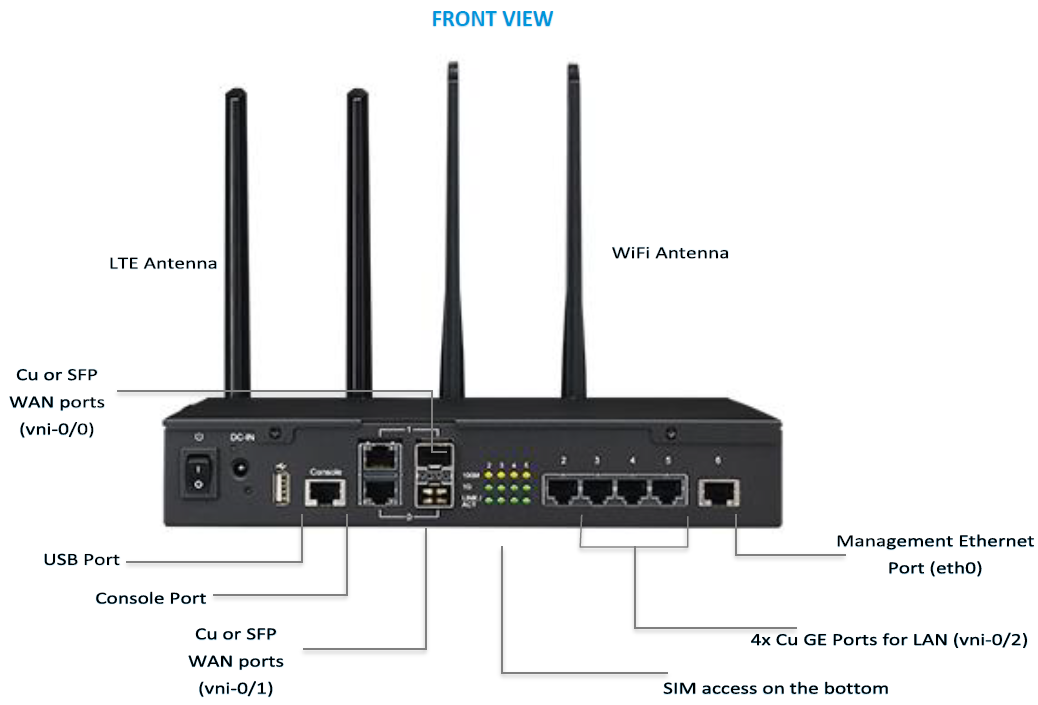
The Versa 1xx-FWA-1010VC hosts a LAN switch module which has physical ports from 2 to 5 (refer image). The switch module is connected to the processor complex through a backplane ethernet interface vni-0/2.
Interface State of vni-0/2
Prior to 16.1R1-S6/16.1R2-S2 Release
When the admin status of the interface vni-0/2 (backplane interface) is enabled, the operational status of this interface changes to UP, regardless of the switch port link states. This behavior disrupts certain features that depend on the operational state of the interface, VRRP failover is one such instance.Enhancements in 16.1R1-S6/16.1R2-S2 Release
To resolve this abnormal behavior, Versa FlexVNF with enhancements in 16.1R1- S6/16.1R2-S2 release adds support for periodic polling of the switch ports and obtain the operational status of vni-0/2 based on the switch link ports.The operational status of the backplane interface vni-0/2 (when administratively enabled) is determined by switch port link states.vni-0/2 is Operationally UP if any of the switch ports link is up vni-0/2 is Operationally DOWN if all the switch ports link is down
The switch port link state polling is enabled on all four ports, with the same polling interval as the other vni interfaces (one second). Hence, no manual configuration is required.
BIOS Upgrade
The switch port link state requires a new BIOS from Advantech. All new units from Advantech comes with the new BIOS, but the existing units at customer sites/lab requires an update with the latest BIOS.
Run the sudo dmidecode -s bios-version shell command to check the BIOS version.
$ sudo dmidecode -s bios-version
1010VCV016
NOTE: BIOS upgrade is required if the version is older than V018.
BIOS Upgrade Procedure
Follow these steps to install the new BIOS:
- Click this https://versanetworks.app.box.com/s/hyxlynjz49zs8zvry4fl1w0qhvbqog8o to download the bios_upgrade.tar file.
- Run the tar -xvf advantech_fwa1010vc_bios_upgrade.tar shell command to extract the contents of the downloaded file.
$ tar -xvf advantech_fwa1010vc_bios_upgrade.tar
advantech_fwa1010vc_bios_upgrade/ advantech_fwa1010vc_bios_upgrade/1010VCV018.bin advantech_fwa1010vc_bios_upgrade/README advantech_fwa1010vc_bios_upgrade/1010_bios_revisions.txt advantech_fwa1010vc_bios_upgrade/flashrom
- Run the uname -r shell command to verify the kernel version.
$ uname -r
3.16.0-77-generic
- Run the sudo ./flashrom -w 1010VCV018.bin -p internal:laptop=this_is_not_a_laptop shell command to verify the flash.
$ sudo ./flashrom -w 1010VCV018.bin -p internal:laptop=this_is_not_a_laptop
flashrom v0.9.9-r1955 on Linux 3.16.0-77-generic (x86_64)
flashrom is free software, get the source code at https://flashrom.org
Calibrating delay loop... OK.
Found chipset "Intel Avoton/Rangeley".
Enabling flash write... Warning: SPI Configuration Lockdown activated. OK.
Found Winbond flash chip "W25Q64.V" (8192 kB, SPI) mapped at physical address 0x00000000ff800000. Reading old flash chip contents... done.
Erasing and writing flash chip... Erase/write done.
Verifying flash... VERIFIED.
- Run the sudo ./flashrom -v 1010VCV018.bin -p internal:laptop=this_is_not_a_laptop shell command to verify the BIOS upgrade.
$ sudo ./flashrom -v 1010VCV018.bin -p internal:laptop=this_is_not_a_laptop
flashrom v0.9.9-r1955 on Linux 3.16.0-77-generic (x86_64)
flashrom is free software, get the source code at https://flashrom.org
Calibrating delay loop... OK.
Found chipset "Intel Avoton/Rangeley".
Enabling flash write... Warning: SPI Configuration Lockdown activated. OK.
Found Winbond flash chip "W25Q64.V" (8192 kB, SPI) mapped at physical address 0x00000000ff800000. Reading old flash chip contents... done.
Verifying flash... VERIFIED.
- Perform a reboot on your system.
- Run the sudo dmidecode -s bios-version shell command to verify the newly installed BIOS version.
$ sudo dmidecode -s bios-version
1010VCV018
- Run the grep 'gpio_mdio'/proc/modules shell command to verify the loaded module.
$ grep 'gpio_mdio'  /proc/modules
gpio_mdio 13284 0 - Live 0x0000000000000000 (OE)
- Run these shell commands when the loaded module is not detected.
$ sudo echo 'gpio_mdio'  | sudo tee -a /etc/modules;
$ sudo modprobe gpio_mdio
CLI Enhancements
With 16.1R1-S6/16.2R2-S2 release, Versa FlexVNF provides the flexibility to control:
- Switch ports link status polling.
- Mapping the switch port(s) link status to backplane operational status (vni-0/2).
CLI Configuration
% set system platform
fwa - 1010
{
  switch-link-polling
  {
    enable[true|false];
    interval <number>;
    ports[port2 port4];
  }
}
NOTE: No front-end (GUI) configuration is provided for this feature to enable.
- Enable [true|false]: You must enable/disable the periodic switch port state polling, but when you select disable the operational status of the interface vni-0/2 remains UP, same behavior prior to 16.1R1-S6/16.2R2-S2 release.
- Interval: You must configure switch port state polling interval in seconds (default is 1 sec).
- Ports: Specify the list of switch ports that requires polling that in turn decide the operational state of the backplane interface vni-0/2.
Default Behavior
- vni-0/2 is operational status is Up if any of the switch ports link is UP.
- vni-0/2 is operational status is DOWN if all the switch ports link is down.
NOTE: In some use cases, you are allowed to configure port 2 and port 4 for vni-0/2 operational state.