Creating a Vendor Catalog
Follow these steps to create a third party VNF to the Versa FlexVNF’s vendor catalog:
Select Versa Director > Administration > Inventory > Vendor Catalog and click
 to create a new vendor catalog.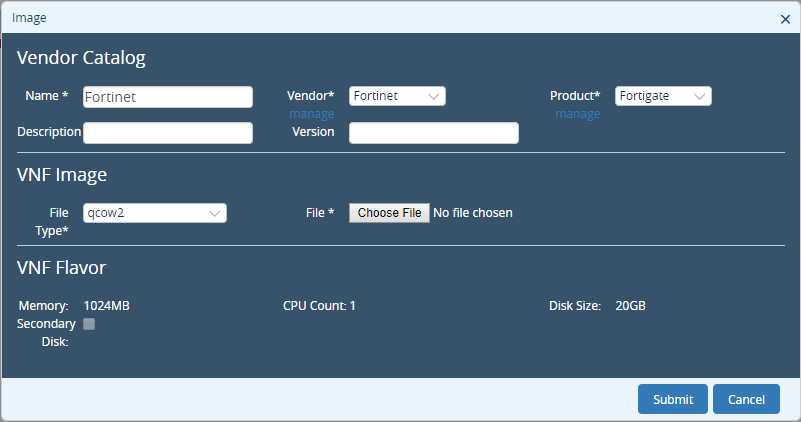
Enter these details and click Submit.Field Description Name Specify the name of the new uCPE that you are adding to the Versa FlexVNF. Description Specify the description of the interface and its purpose. Vendor Specify the Vendor that is supported on Versa FlexVNF: - Fortinet
- Riverbed
- Secui
Version Specify the uCPE version for the selected vendor. Product Specify the Vendor's product/model. File Type Specify the VNF image file type. Currently, qcow2 version is supported on the Versa FlexVNF. File Specify the qcow2 file name. Click manage under Vendor to obtain Manage Vendors window.
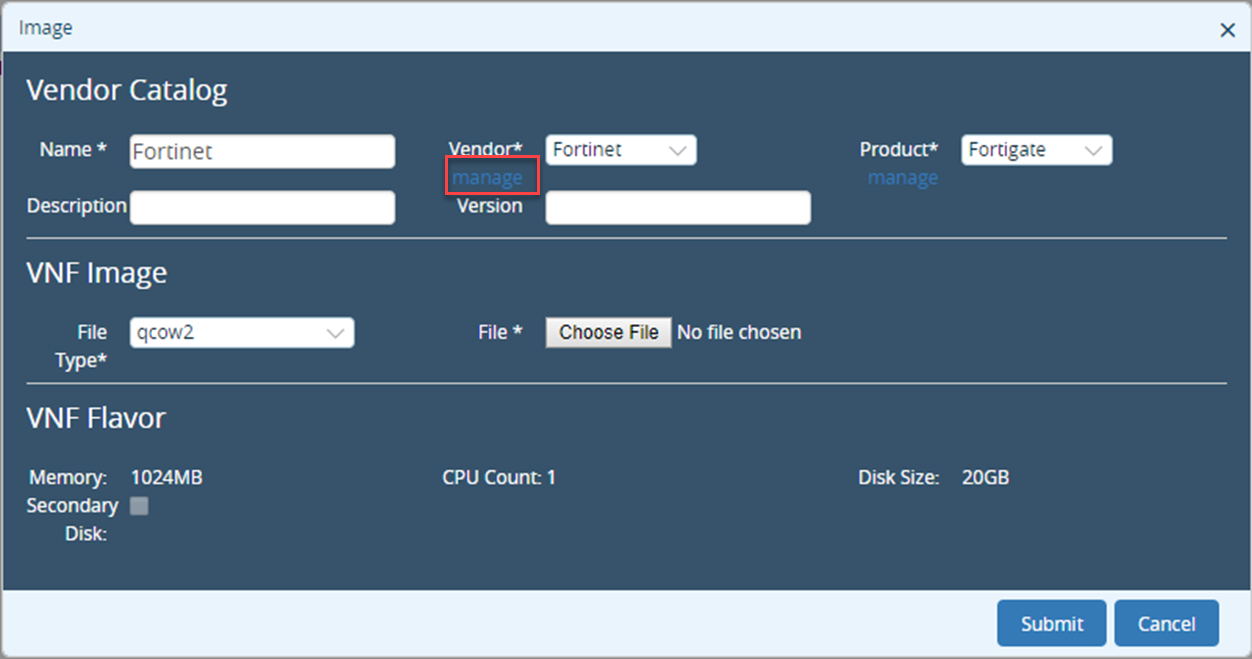
Specify the Vendor Name and click Create to Create New Vendor.
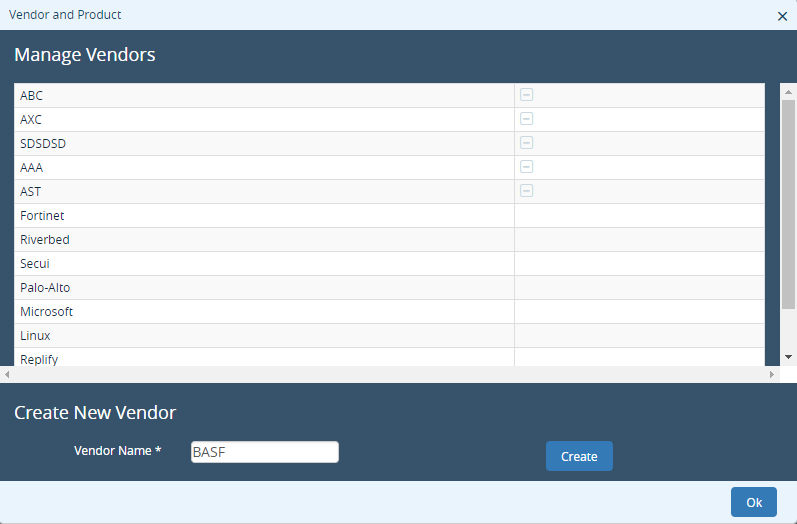
Manage Products window allows the user to Create Product for Vendor.
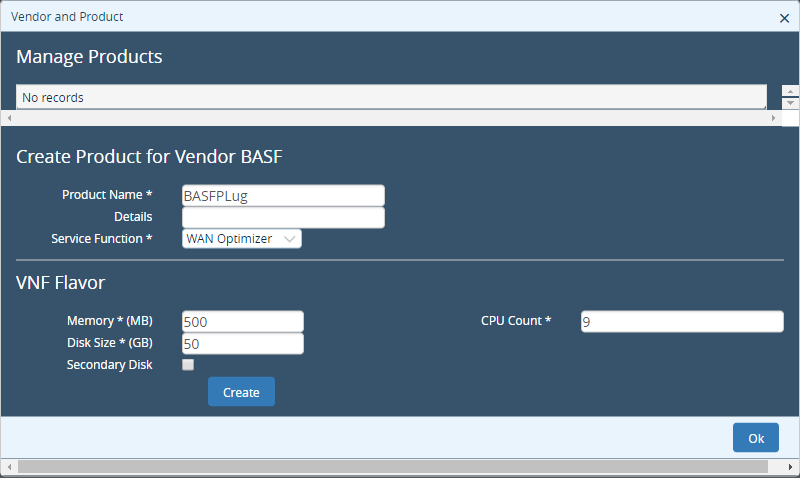
Enter these details and click Create and Ok.Field Description Product Name Specify name of the product. Service Function Specify the type of product: - Firewall
- NextGen Firewall
- WAN Optimizer
- Others
Memory (MB) Specify the memory capacity of the product. Disk Space (GB0) Specify the disk space occupied by the product. CPU Count Specify the number of CPU counts. Secondary Disk Enable it when the secondary disk is required.
Creating a Service Chain Workflow (Per Tenant)
Follow these steps to configure the Versa FlexVNF service chain workflow on per tenant basis:
Select Versa Director > Workflows > Template > Service Chains and click
 to create a new Service Chain.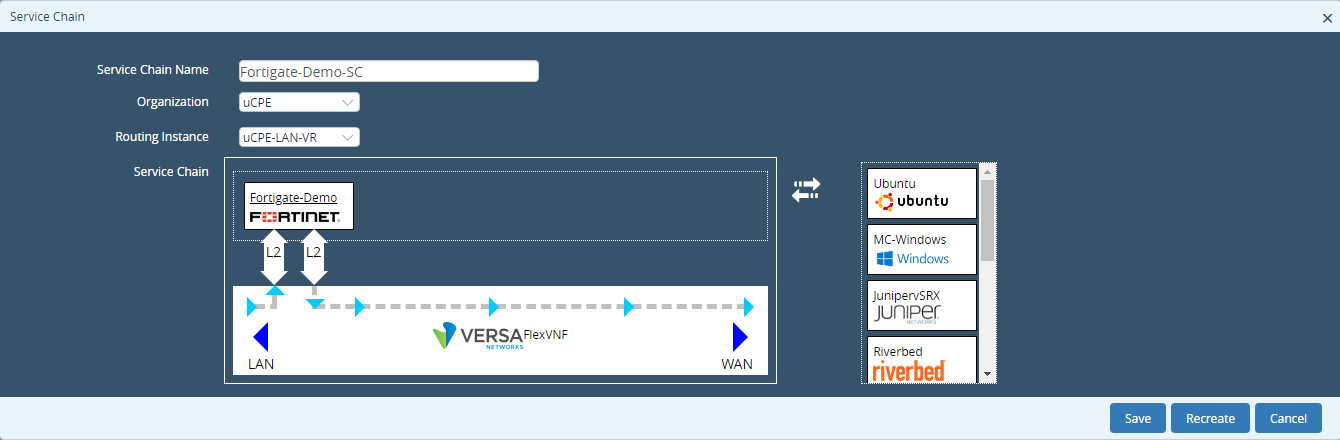
Enter these details and click Recreate.Field Description Service Chain Name Specify the name of the service chain. Organization Specify the organization to which this service chain belongs. Routing Instance Specify the routing instance used for this service chain instance. Service Chain Select the VNF from the list and drag and drop it to the Versa FlexVNF box. This chains the third-party VNF with the Versa FlexVNF. Click the Fortigate (new uCPE service chain) to modify the guest VNF’s (uCPE) configuration. This opens the VNF Attributes window.
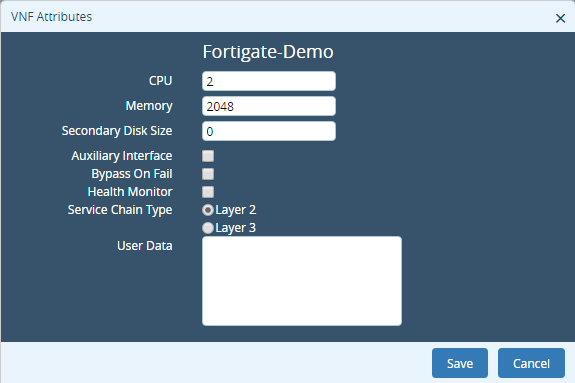
Enter these details and click Save.Field Description CPU Specify the number of CPU count. Memory Specify the CPU memory limit for the selected guest VNF. Secondary Disk Size Specify the secondary disk size of the guest VNF (if any). Auxiliary Interface Enables the guest VNF as an auxiliary interface. Service Chain Specify the Layer on which the service chain is configured: - Layer 2
- Layer 3
User Data Specify the user data about the guest VNF for reference. Click Save & Deploy to commit the service chaining of the 3rd party VNFs on the Versa FlexVNF.
Creating a Post-Staging Service-Chain Workflow
Follow these steps to create a post-staging service chain workflow on per tenant basis:
- Select Versa Director>Workflows > Template > Templates and click
 to Create Template.
 - Select the Interfaces tab and provide the LAN and WAN interfaces details. Refer Configuring interfaces and networks for SD-WAN controller (Versa FlexVNF Advanced SD-WAN Configuration Guide) on how to configure LAN and WAN interfaces.
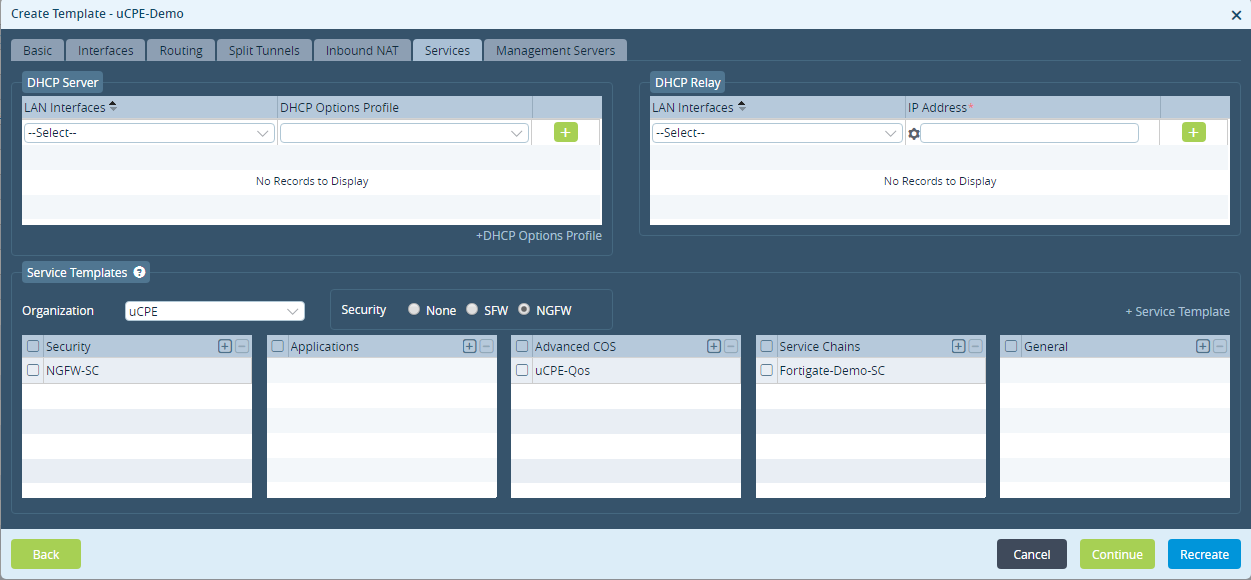
- Select the Services tab and associate the respective service chain workflow across the tenant and click Recreate. select the service chain and associate it to the provider tenant when the template has both provider and customer tenant.
Adding Devices to the Device Template
Follow these steps to add devices to the device template:
Select Versa Director > Workflows > Devices > Devices and click
 to add a device to the device template.
Select the Basic tab and specify a device name and associate an organization to the device and add the device to a device group.
Select the Bind Data tab and user will see both the post-staging template and service-chain workflow template variables.
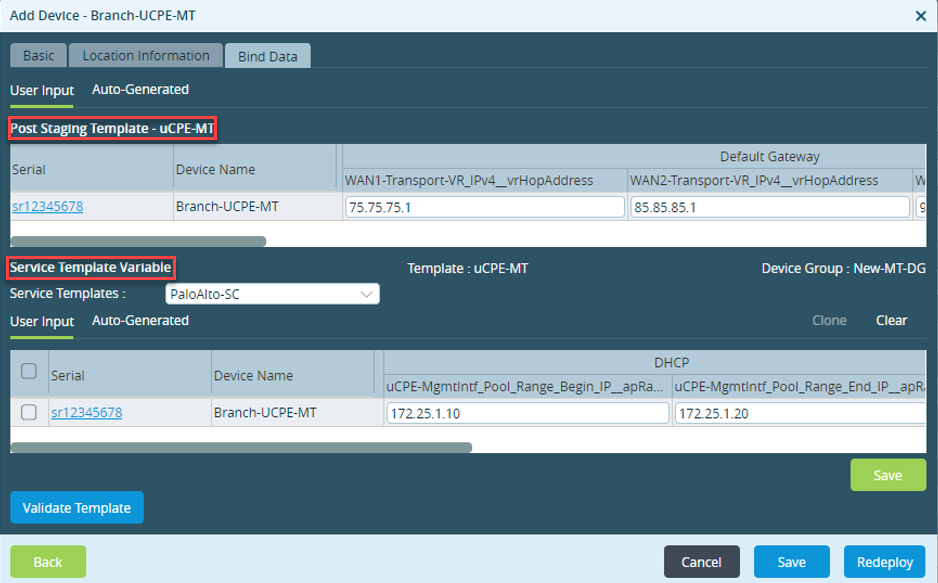
Specify the DHCP start and end pool address values in the DHCP server configuration running in the Control-VR. This is assigned to the management interface of the VNF provided by the VNF management interface in dhcp client mode.
Onboarding the device through Zero Touch Provisioning (ZTP)
- Bring up the device using ZTP. Refer to URL Based Zero Touch Provisioning (Versa Device Activation and Zero Touch Provisioning Guide).
- Reboot the device. After the device is up, the controller sends the post-staging notification to Versa Director.
Versa Director copies the qcow2 file to the respective device and triggers the command to start the VNF.
NOTE: Before copying the file, Versa Director checks if the same qcow2 file exists in the device (in the directory /home/versa/images), in which case it does not overwrite the existing file.
Verifying the uCPE Configuration
Follow these steps to verify the configuration of uCPE in the Versa FlexVNF:
- Select Versa Director >Administration > Appliances to view the list of appliances configured on the Versa FlexVNF.
The dashboard will now have a new entry for the uCPE added in the previous section.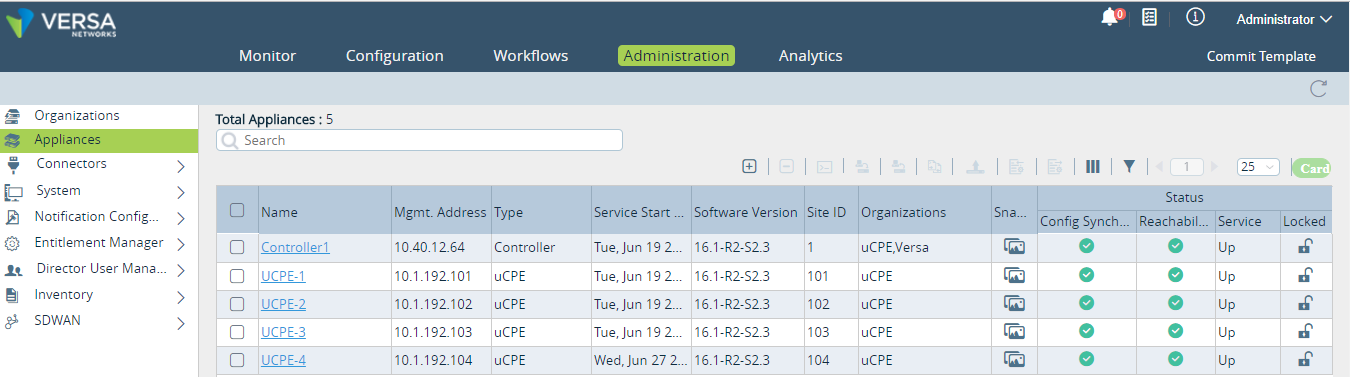
Monitoring uCPE
Follow these steps to monitor the uCPE on the Versa FlexVNF:
- Select Versa Director > Monitor > Org > Devices > uCPE to view the uCPEs statistics.
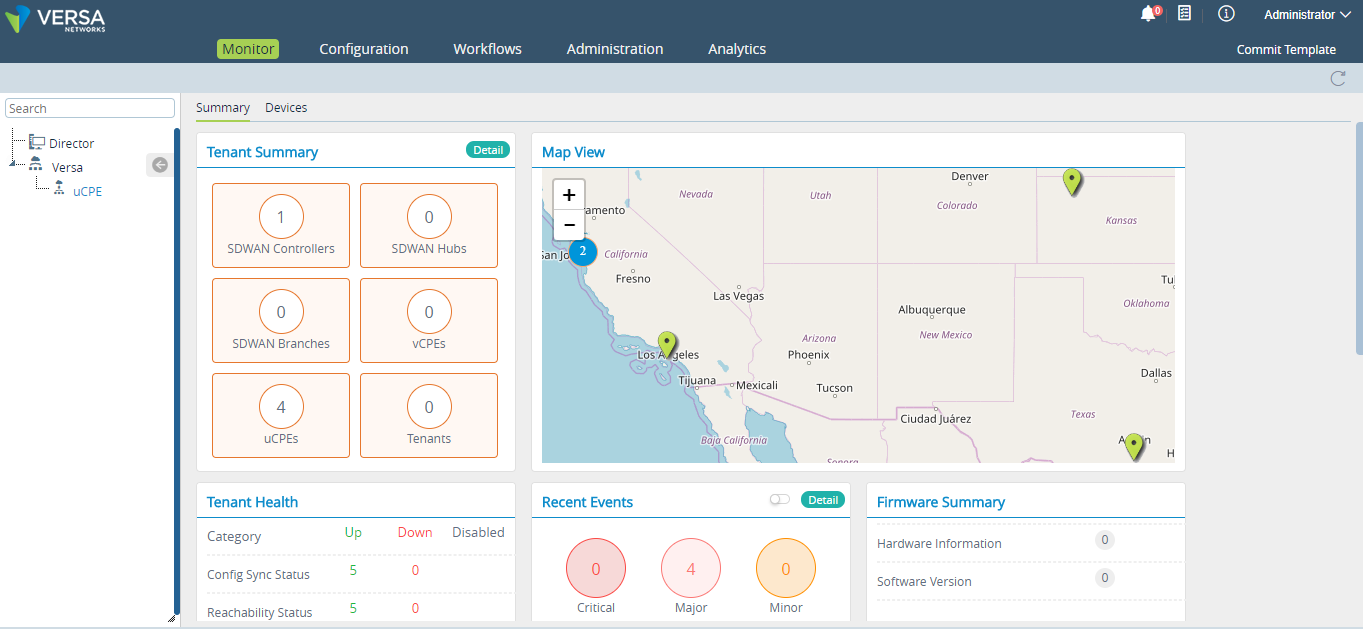
- Select the Guest VNFs tab in the dashboard to view the details of the onboarded uCPE.
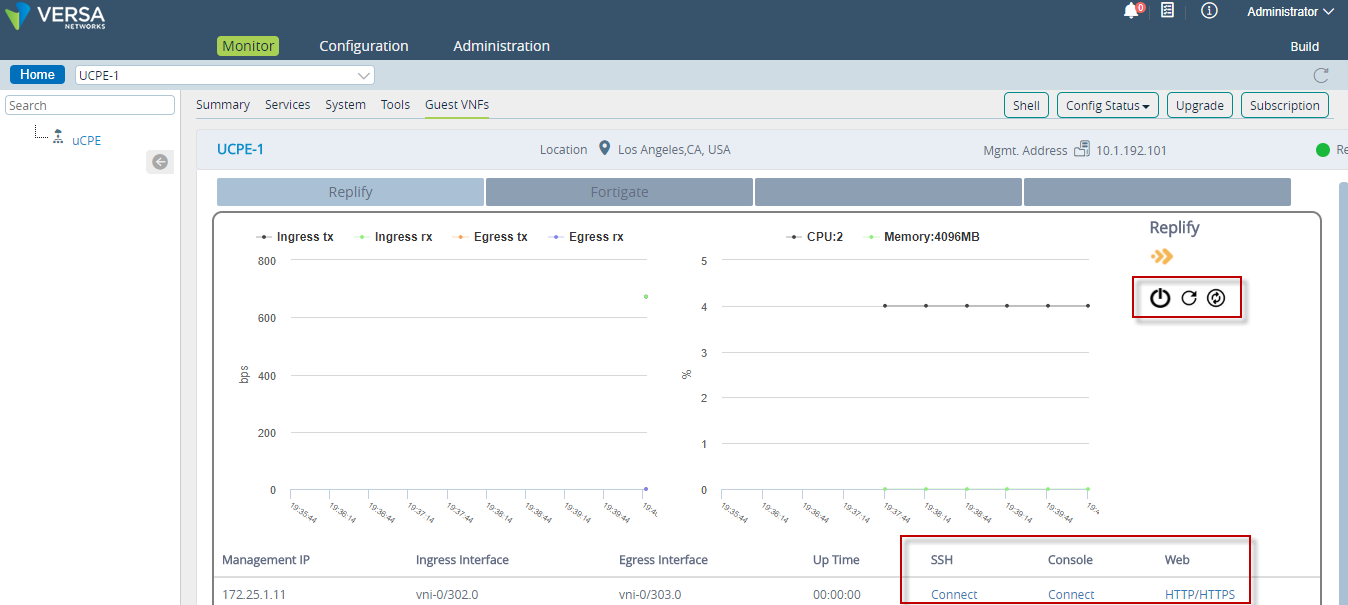
The dashboard displays these two graphs:
- CPU/Memory graph over a 30 second interval.
- Ingress/Egress tx/rx statistics over a 30 second interval.
User can use this dashboard to Shutdown, Reset and Reboot the uCPE.
Viewing the uCPE on Versa Analytics
Follow these steps to view the uCPE on Versa Analytics:
- Select Versa Director >Analytics > Dashboards > System > GUEST VNF to check the various uCPEs (Guest VNF) details on the Versa Analytics.
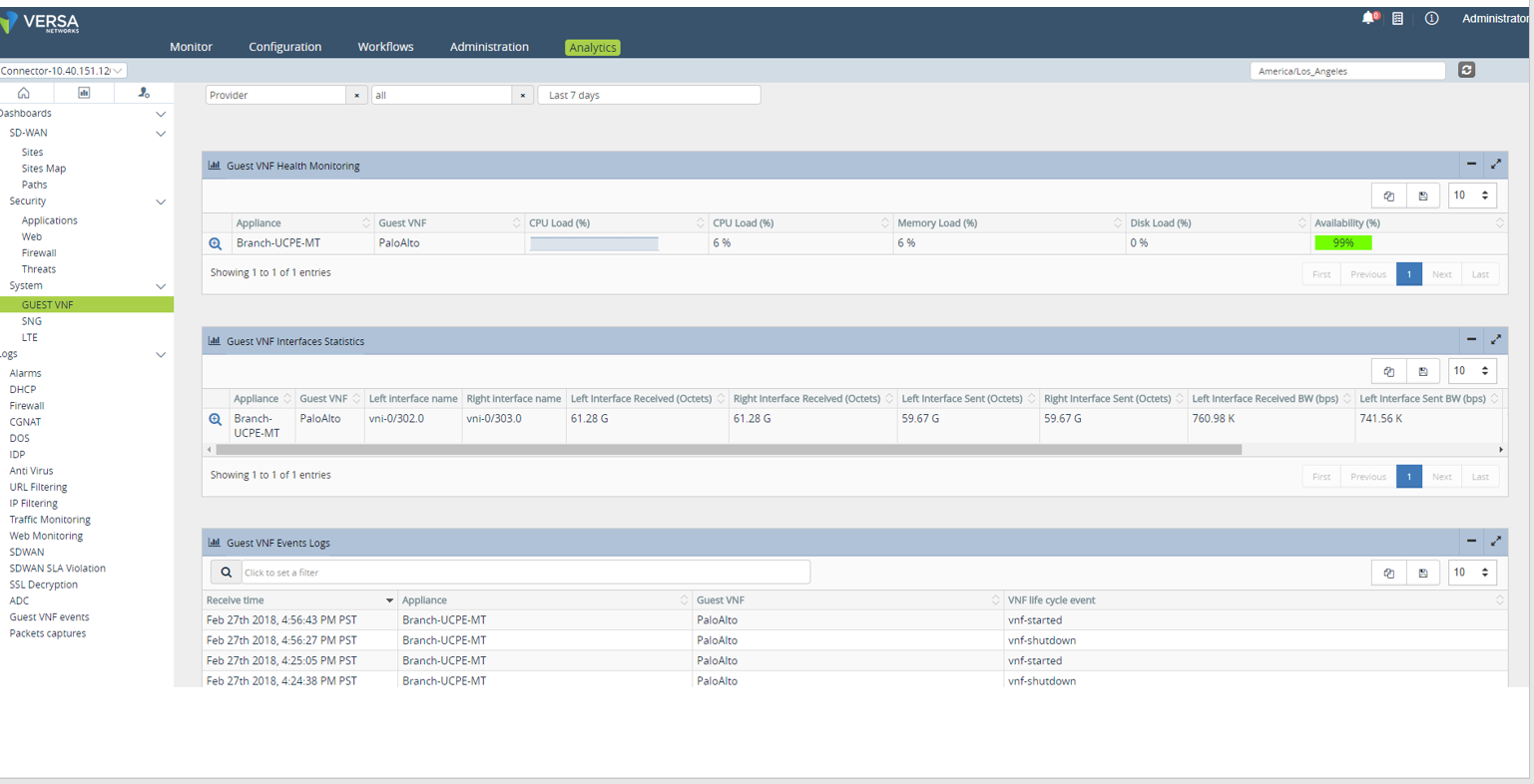
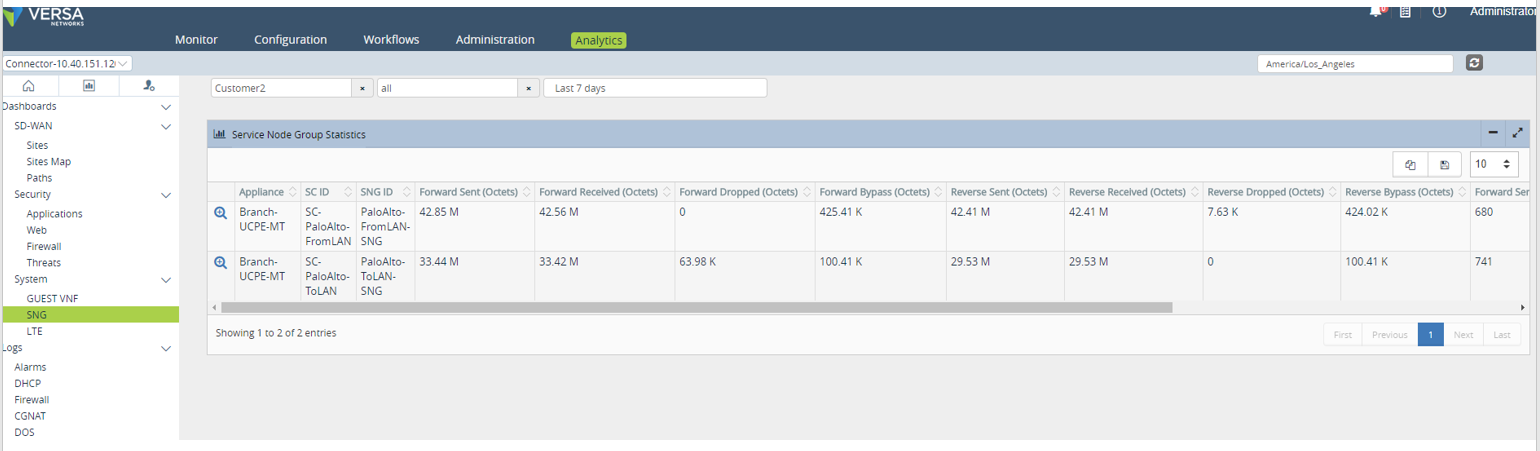
Select Versa Director > Analytics > Dashboards > System >SNG provides the service-node-group statistics per uCPE device. Each VNF in the device associated to 2 SNGs.
--------------------------------------------------------------THE END-------------------------------------------------------------------------------
Versa-virtmgr also depends on the services versa-virtlogd and versa-virtlockd. Check the status of these services in the vsh status output. If this fails to come up, start the services manually.
The following output appears:
Alarms are generated for the data-path reachability between Versa VNF and the third-party VNF. Monitoring is triggered only if bypass-on-fail is generated under the org-level service-chain-instance.
The following output appears: