Question
How to change default password of Versa Director?
Solution
You can change the default password using either Director UI or CLI.
Follow these steps to change default password of Versa Director using UI:
- Login to Versa Director.
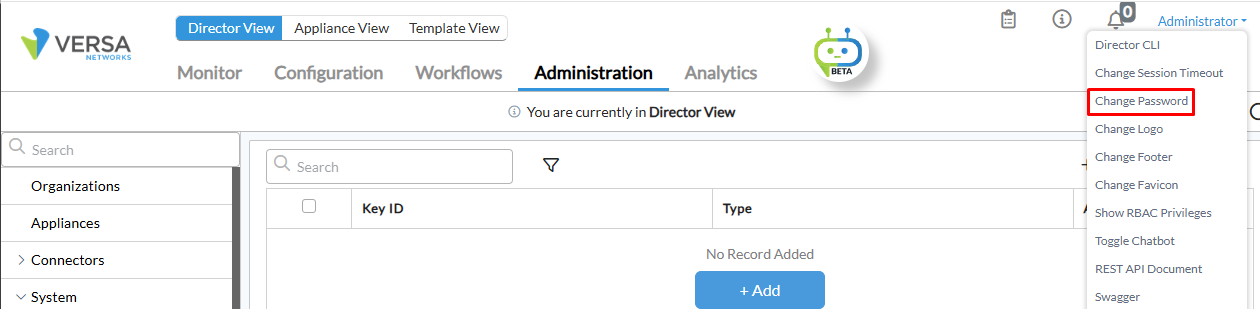
- From Administrator drop-down box, select Change Password.
- Provide the password details and click OK.
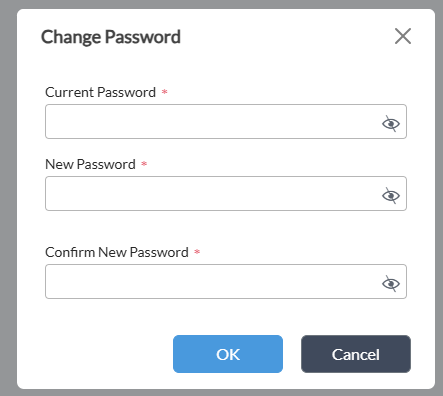
 NOTE: Password needs to be of 8 to 16 character length, with at least one uppercase, one digit, and one special character.
Follow this step to change the default password of Versa Director using CLI.
- Run request nms actions reset-password-by-admin username Administrator newpassword.
@versa-director> request nms actions reset-password-by-admin username Administrator newpassword
SSH password
- Run sudo su Linux command to change SSH password.
Example:
admin@versa-director:~$ sudo su
[sudo] password for admin:
root@versa-director:/home/admin# passwd admin
Enter new UNIX password:
Retype new UNIX password:
passwd: password updated successfully